CPSC 1070
Programming Methodology
Fall 2019
Scene File Read and Display
Homework Assignment 3
Due by midnight: Sunday Oct. 6
For this assignment, you are to develop a program that will read in a scene description file, and build a display based on its contents. The scene file name should be specified on the command line. The scene file will be a plain text file, which you can produce with vim or any text editor. It can include descriptions of triangles, circles, rectangles, polygons, and polylines, as well as drawing colors. For each of these kinds of objects, the entry in the scene description file should look as follows:
    window
      <width> <height>

    backcolor
      <red> <green> <blue>

    color
      <red> <green> <blue>

    triangle <f|o>
      <x0> <y0> <x1> <y1> <x2> <y2>

    circle <f|o>
      <cx> <cy> <radius>

    rect <f|o>
      <xll> <yll> <width> <height>

    polygon <f|o> <npoints>
      <x0> <y0> <x1> <y1> ... <xn-1> <yn-1>

    polyline <npoints>
      <x0> <y0> <x1> <y1> ... <xn-1> <yn-1>
Each object starts with the object name.
The drawable objects are triangle, circle, rect, polygon, and polyline. Each drawable object except for polyline, is followed by a single letter determining the drawing style, either an 'o' for outline of 'f' for fill. For polygon and polyline there must also be an integer number specifying how many points are to be used to describe the object. Following this is a complete description of the object, where the items enclosed by < and > are meant to be numbers. Triangles have three points, circles have a center position and a radius. Rectangles have the position of the lower lefthand corner and the width and height. Polygons and polylines have a list of points describing the object.
The nondrawable objects are window, backcolor, and color. window is followed by the window width and height in pixels. Both backcolor and color are followed by their red, green, and blue components (which must be integers on a scale from 0 to 255).
Except for window and backcolor, all objects can appear in any order in the file, and there can be as many objects as desired. These should be drawn into the picture in the order specified in the file. (Note: for now, it is not possible to draw a filled polygon, so just ignore the 'o' or 'f' status and draw the polygon's outline. We will address this problem in a future assignment.)
Once a color is specified, all subsequent objects should be drawn in this color, until a new color specification is made.
There should be at most one window and one backcolor. Since they are used to determine the size and background color for the drawing, they should be the first items in the file, if they are provided. If no window is provided, the default window size should be 800 x 600. If no backcolor is provided, the default background color should be black.
Here is an example scene file, and the image that it creates.
            window
            1000 600

            backcolor
            150 150 150

            color
            255 0 0

            triangle o
            100 400
            240 400
            160 480

            color
            255 127 0

            triangle f
            300 400
            360 460
            420 360

            color
            255 255 0

            circle o
            500 400
            60
            color
            0 255 0

            rect f
            600 360
            140 80

            color
            0 0 255

            polygon o 5
            380 220
            440 280
            500 300
            540 240
            480 200

            color
            127 0 255

            polyline 5
            780 360
            800 400
            840 420
            880 400
            940 440
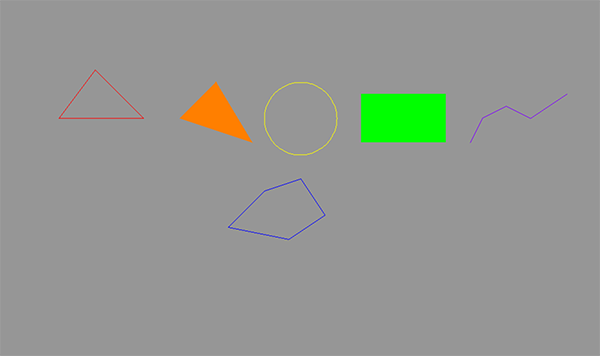
Here is a suggested organization for the program. In your main() function, before
starting EZ Draw and entering the event loop,
call a function to read the file and build a display list. The display list should
be an array of structs, with each struct holding the information needed to draw an
item specified in the scene file. The EZ Draw event loop does not need to do anything but
call the display function. The display function should clear the drawing,
run through the display list and draw each item in order, and finally display the drawing.
You must write your program in C using EZ Draw to do the graphics. Note, that you must now have the ezdraw.h and libezdraw.a files in a separate directory so that they don't need to be copied for every program you build. Refer to the Makefile Lab on Sept. 9. Remember that your program must be compiled and tested on the School of Computing Linux system using your Makefile before turning it in. I cannot support grading programs done in an IDE, since I use scripts to prepare your assignments for testing.
Grading Rubric
Click here for the grading rubric that will be used.
Turn-in Procedure
You are to turn in this assignment via the web interface at: http://handin.cs.clemson.edu.
On this page you will be able to log in, and go to the help pages for all information on how to submit an assignment. Our course is CPSC 1070-001 or CPSC 1070-002. This homework project is called "scene file" on the course page.
Before turning in your work, please follow these instructions. This is very important, since we process your assignments via an automated script.
- Make a directory named with your Clemson username in lower case. Do not add any additional text, and do not include any spaces in the filename!
- If you have done anything in your program that deviates from the problem statement, please include a plain text README document (not .pdf or .docx) that gives any instructions needed to run the program, or understand what it is doing.
- Place all of your work in a flat-structured directory. There should be no subdirectories. Delete all .o and executable files, and any IDE project files. All that should be there are your scene file, your Makefile, any .c or .h files you used to build your program, and a README file (if you needed one). Note, that you should not include the ezdraw.h and libezdraw.a files.
- tar and gzip your directory, or zip your directory. If your username were monty, then your zipped file would be named either monty.tar.gz, or monty.tgz, or monty.zip
- Turn in only this zipped directory.