CPSC 1070
Programming Methodology
Fall 2019
Better Bubbles
Homework Assignment 4
Due by midnight: Sunday Oct. 27
For this assignment, you are to redo the bubble pipe homework assignment but this time using images instead of simple drawings for the background scene, the pipe, and the bubble. An example of the finished program can be seen below.
Video of a working version of the new bubble pipe program
To do this assignment, you first need to install a new version of EZ Draw for Linux, which you can
download here, or if you are working on a Macintosh, you can
download this Macintosh version. Once you unzip this file, make sure to copy libezdraw.a and
exdraw.h to your ezdraw directory at the top of your directory hierarchy.
The new version of the manual describes a
new EZ Draw struct type EZ_Image, and routines EZ_CreateBlankImage() and
EZ_LoadBMPImage()
for creating images. The manual also describes the management of textures that are used for
displaying and moving around images in the display window. The routines are
EZ_CreateTexture(),
EZ_DestroyTexture(), and EZ_DrawTexture().
You can examine and try out the
helloworld example
to see how an image can be downloaded from a file and displayed using a texture.
You will also want to download a set of images here, which you can use to do the assignment. The images look like this:


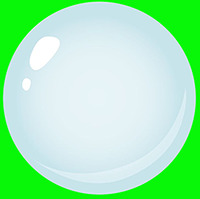
Your challenge is for your code to modify the pipe and bubble images, by making their green regions transparent, and to modify the bubble image so the bubble is semi-transparent. After you have done that, your drawing routine just needs to draw the background image, the pipe image, and the bubble image where you want them in the window. What you need to know in order to do this is that each pixel of an image, along with its RGB color components, has a fourth component known as its alpha component. This determines the pixel's opacity. If alpha is set to 255, the pixel is completely opaque, and if alpha is set to 0, the pixel is completely transparent (i.e. it is invisible). Values of alpha between 0 and 255 are intermediate, giving a semi-transparent effect. For example if a pixel's alpha value is 100, the pixel will be visible but anything it is drawn over will be partially visible underneath it.
The pixels of EZ Draw images all have four color components, red, green, blue, and alpha. Each component is one byte in length, so a pixel occupies 4 bytes, or 32 bits of memory. Pixel bytes are stored in the order R, G, B, A (A for alpha). You can read the EZ Draw manual to see how to access an image's pixels from the EZ_Image data structure.
Here is a suggested organization for the program.
In your main() function, before
starting EZ Draw and entering the event loop, create the three images that you will
need by reading them from their .bmp files.
Your main job will be to write a Mask() function
and a Fade() function. The Mask() function
will be used for the pipe and bubble images to create the alpha masks needed so that you can
draw the pipe and bubble images into the scene, without their
green backgrounds. The Fade() function will be used
to lower the opacity of the bubble
image so that it is translucent when drawn over the background scene.
Once the images are created you can initialize EZ Draw, with the window width and height matching your background image. This not only opens the window, but gets EZ Draw ready to send texture images to the graphics card.
With EZ Draw started, you can create textures on the graphics card for all three images.
From here on in, the program proceeds much like your homework 1 bubble pipe program, except that instead of drawing a pipe and bubble over a blank background, your display routine will fill the window with the background image, place the pipe image over the background, and if the bubble is being shown, place the bubble at its current position in the image.
You must write your program in C using EZ Draw to do the graphics. Note, that you must now have the ezdraw.h and libezdraw.a files in a separate directory so that they don't need to be copied for every program you build. Refer to the Makefile Lab on Sept. 9. Remember that your program must be compiled and tested on the School of Computing Linux system using your Makefile before turning it in. I cannot support grading programs done in an IDE, since I use scripts to prepare your assignments for testing.
If You Want More of a Challenge
If you feel like you can do this assignment in 15 minutes while on the phone with a friend, you are free to take on more of a challenge. I will happily accept any project you want to submit using EZ Draw, that reads images, creates alpha masks, and does some form of animation. I could imagine a shooter, a Pong game, a game like Space Invaders, use your imagination. If you decide to do such an alternate assignment, make sure to include a well done README file so we know how to run your program.
Grading Rubric
Click here for the grading rubric that will be used.
Turn-in Procedure
You are to turn in this assignment via the web interface at: http://handin.cs.clemson.edu.
On this page you will be able to log in, and go to the help pages for all information on how to submit an assignment. Our course is CPSC 1070-001 or CPSC 1070-002. This homework project is called "better bubbles" on the course page.
Before turning in your work, please follow these instructions. This is very important, since we process your assignments via an automated script.
- Make a directory named with your Clemson username in lower case. Do not add any additional text, and do not include any spaces in the filename!
- If you have done anything in your program that deviates from the problem statement, please include a plain text README document (not .pdf or .docx) that gives any instructions needed to run the program, or understand what it is doing.
- Place all of your work in a flat-structured directory. There should be no subdirectories containing code. It is ok if your images are in a subdirectory. Delete all .o and executable files, and any IDE project files. All that should be there are the images you used, your Makefile, any .c or .h files you used to build your program, and a README file (if you needed one). Note, that you should not include the ezdraw.h and libezdraw.a files.
- tar and gzip your directory, or zip your directory. If your username were monty, then your zipped file would be named either monty.tar.gz, or monty.tgz, or monty.zip
- Turn in only this zipped directory.