CPSC 1070
Programming Methodology
Fall 2019
Building a Maze
Homework Assignment 5
Due by midnight: Sunday Nov. 10
This assignment is to prepare for the next assignment, which will be a prototype
maze-based adventure game. The job for this assignment is to load the maze that
will support the game play, and display it on the screen. The next assignment will
focus on implementing the game play, using the maze built by this assignment.
Your program should be called loadmaze, and it
should be written in C++ using EZ Draw to display the graphics.
Your program will use a filename parameter from the
command line, to get the name of a maze description file.
For example, if the maze description is
stored in a text file named smallmaze.txt,
then the command to run the program would be
loadmaze smallmaze.txt
The program should get the filename from the command line, open the file and read its contents to get the filenames of a set of images that will be used to draw the maze, and the structure of the maze. The program should use EZ Draw to read in all of the images, and it should build a 2D array to hold the maze. The format of the maze description file will be as in the following example of a little maze containing only 5 rows and 7 columns.
    wallimage.bmp
    startimage.bmp
    corridorimage.bmp
    goalimage.bmp
    bossimage.bmp
    healthimage.bmp
    player.bmp
    5 7
    w w w w w w w
    s c c c w h w
    w w w c w c g
    w b c c c c w
    w w w w w w w
The first 6 lines contain the filenames of BMP image files that you will use as textures
to display the rooms of the maze, and the player character.
Each of these images should be square, and of the same size. These are
followed by the filename of an image that will be used to display the game player. The
player image should be somewhat smaller than the other images so that it fits nicely into
a room of the maze, and it should contain an alpha channel so that the
player can be drawn over a room's background. You can use
gimp
to make these images, or you can find suitable ones on the web. In either case, you will want
to use gimp to create the alpha channel for the player.
Following the image filenames, the next line of the file should contain the number of
rows and the number of columns in the maze.
The subsequent lines are organized row by row, and contain characters indicating what
should be placed in each room of the 2D array holding the maze.
The character codes are as follows:
w - wall room,
c - corridor room (these mark the paths the player can follow),
s - starting room,
g - goal room,
b - evil boss room,
h - health room.
After reading in the maze, your program should display it using the correct textures to mark its rooms. Place the player character in the starting room, and draw it over the background for that room.
The player should be movable using the w-a-s-d keys,
where w moves up one room,
a moves left one room,
s moves down one room, and
d moves right one room.
However, the player should not be able to move into a room that is a wall, or out
of the maze.
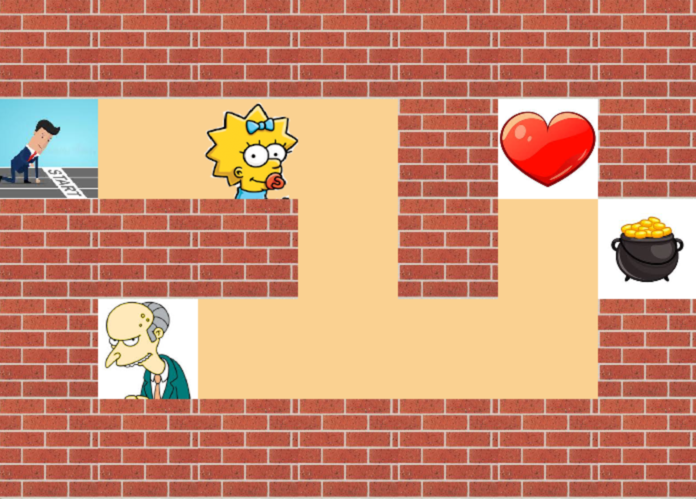
The example below shows what the display might look like using Maggie and Mr. Smithers from the Simpsons as the player and boss characters, a heart for a health room, and a pot of gold for the goal room.
Recommended Program Structure
It is recommended that your create three classes for your C++ program, one to handle the maze, one to handle the individual rooms of the maze, and one to handle the player. In my sample solution, I call these Maze, Room, and Player. This will give you a structure that will be quite useful for the next assignment, when we turn this program into a playable game. Maze is responsible for loading the file and building the maze 2D grid maze structure, for initializing each of its rooms, and for iterating over the rooms when the maze is to be displayed. Room is responsible for storing its type and texture number, and for displaying itself. Player is responsible for storing its current position and its texture number, and for displaying itself.
When you turn this into a game, the rooms will also be responsible for any effect they have on player health, for detecting the player reaching the goal, and for keeping track of decision points. The player will also be responsible for keeping track of its health, and a stack of decision points.
Image and Maze Files
Click here for a set of image files, and two example maze description files. You are free to use these, but if you have time, it might be more interesting to choose your own images and design your own maze.
Grading Rubric
Click here for the grading rubric that will be used.
Turn-in Procedure
You are to turn in this assignment via the web interface at: http://handin.cs.clemson.edu.
On this page you will be able to log in, and go to the help pages for all information on how to submit an assignment. Our course is CPSC 1070-001 or CPSC 1070-002. This homework project is called "build maze" on the course page.
Before turning in your work, please follow these instructions. This is very important, since we process your assignments via an automated script.
- Make a directory named with your Clemson username in lower case. Do not add any additional text, and do not include any spaces in the filename!
- If you have done anything in your program that deviates from the problem statement, please include a plain text README document (not .pdf or .docx) that gives any instructions needed to run the program, or understand what it is doing.
- Place all of your work in a flat-structured directory. There should be no subdirectories containing code. However, it is ok if your images are in a subdirectory. Delete all .o and executable files, and any IDE project files. All that should be there are the images you used, a maze description file, your Makefile, any .cpp or .h files you used to build your program, and a README file (if you needed one). Note, that you should not include the ezdraw.h and libezdraw.a files. These should be in a directory named ezdraw at the top of your directory heirarchy, and your Makefile should look for these files there. If your Makefile looks for these files anywhere else, it will not compile when the TA's attempt to grade your program.
- tar and gzip your directory, or zip your directory. If your username were monty, then your zipped file would be named either monty.tar.gz, or monty.tgz, or monty.zip
- Turn in only this zipped directory.