You are to write a very basic raycasting renderer that renders a set of spheres arranged in space. Shoot a ray from the camera viewpoint through the center of each pixel, and color that pixel the color of the closest sphere hit by the ray. If the ray hits no sphere, color the pixel black.
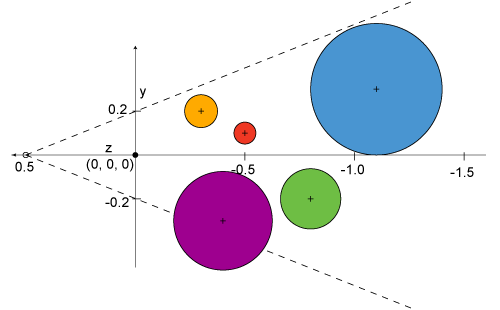
Your camera should be located 1/2 meter from the origin at (0, 0, 0.5) and be aimed along the negative z-axis. The viewscreen should be centered at the origin; parallel with the x-y plane, and with sides parallel to the x and y-axes. The height of the viewscreen should be 0.4 m, and its aspect ratio is 5/4. The scene should consist of five spheres with the following properties (all measurements in meters):
|
Color |
Radius |
Center |
|
red |
0.050 |
(-0.3, 0.1, -0.5) |
|
green |
0.150 |
(0.0, -0.2, -0.8) |
|
blue |
0.300 |
(0.3, 0.3, -1.1) |
|
orange |
0.075 |
(0.1, 0.2, -0.3) |
|
purple |
0.225 |
(-0.2, -0.25, -0.4) |
The figure above shows a side view of the scene, with the +x axis pointing towards you, out of the image.
Your program
should
be named raycast.
The
program
should be able
to render and display either a parallel projection or a
perspective
projection of the scene, and should allow a variable pixmap
resolution
for rendering the scene. The program commandline should have the
format
(note: the square
brackets
denote optional arguments; they should not be included on the
command
line.):
You should test
your program by rendering very small images. Once the program is
working try a
higher resolution of at least 750 x 600 pixels and save this
image.
Introduce planes to the
scene. For example, the five spheres could be placed in an open
box
formed by the intersection of five planes, top, bottom, left,
and right
planes, and a back plane.
 |
 |
| Orthographic
View |
Perspective
View |