|
|
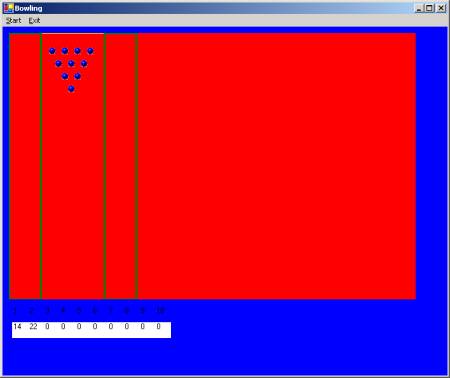
Figure 1 The Bowling Startup Configuration
When play starts, the player moves the mouse to a position at the start of the lane (opposite end from the pins). A left click of the mouse launches a bowling ball down the lane (toward the physical top of the screen). The ball either falls into the gutter and misses all the pins or it knocks down some number of pins.
As the bowling ball moves through the set of pins, it encounters various components of the play field. The interactions between them are as follows [see Figure 2].
Lane
The bowling ball is bounded by the lane that includes the normal surface and the two gutters. The lane contains a triangular array of pins. The ball hits the set of pins. Some of the pins are knocked over (disappear).
|
|
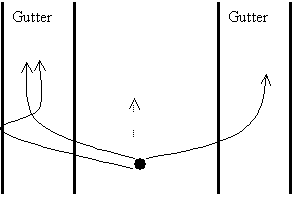
Figure 2 Interactions between Bowling Ball and Boundaries
Gutter
Each gutter allows a ball to enter but does not allow the ball to leave. Once in the gutter, the ball will miss all pins. The ball “counts” and the score is zero.
Pins
· When the bowling ball directly hits a pin, the pin disappears.
· Currently there is no interaction among the pins. That is, one pin does not knock another pin down. This may be added at a later time.
Bowling
Ball
The player is given a ball for each legal throw. That is, two balls per frame. If the player makes a spare in the 10th frame, one extra ball is provided. Each ball that is provided randomly selects a track to follow down the lane.
Game Environment
The first implementation of Bowling is to run as an application within a Microsoft Windows® environment and behaves as follows:
· The game shall start when there is a left click of the mouse.
· A player can “exit” the game at any time before the full set of frames is completed..
· A player can “pause” the game at any time until play ends.
· A player can “resume” a paused game.