|


Glossary of Computer Terms
(5C)
Int'l Trade Terms
HIPAA Glossary
****************************
USA Founding
Documents

United We
Stand!

Never
Forget!
Support our Troops!

Remember our Veterans!

****************************
Company Profile
Privacy
Contact Us!
***********************
Visit IQ-Home for
your housing design needs:

***********************
Updated:07/04/2006
Copyright © 1996-2006 Management Systems Consulting,
Inc. |
|

RUP
Fundamentals Presentation
Index
- What
is RUP?
- What
will RUP do for you?
- RUP
Process Architecture
- RUP
Best Practices
- Develop
Iteratively
- Use
Component Architectures
- Model
Visually (UML)
- Verify
Quality
- Control
Changes
- Management
Requirements
- Manage
Functional Requirements
- Manage
Requirements Use Cases
- Manage
Documentation, Audit and Risk
1. What is RUP?
- Stands for Rational Unified Process
Framework
- Needs to be configured/tailored
- Contains phases, iterations, and
workflows
- Has artifacts, templates, and
guidelines
- Helps an organization achieve
Capability
Maturity Model
(CMM)
level 2/34/5 capabilities.
2. What will RUP do for
you?
- Improve existing processes based on
proven software engineering expertise
- Provide standards for requirements
management
- Provide processes that support
object-oriented analysis, design development for new J2EE efforts based
on industry standard Unified
Modeling Language (UML)
- Well supported by industry leading
tools.
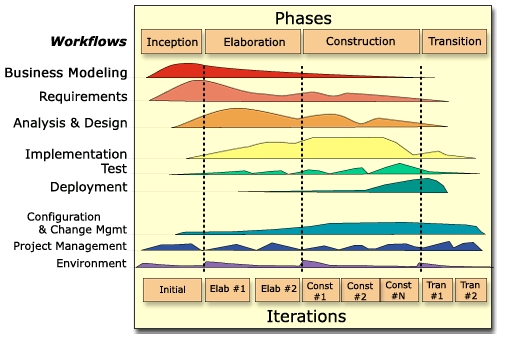
3. RUP Process
Architecture
4. RUP Best
Practices

5. Develop
Iteratively
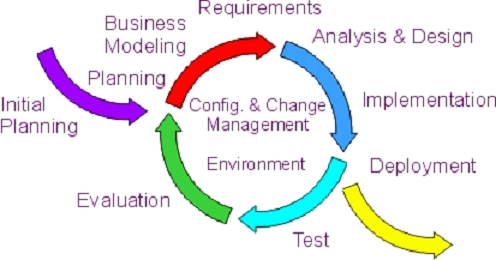
- RUP definition:
- Similar to current approach (i.e.
one iteration per business area)
- Recommends a further breakdown
(iterations) within specific releases
6. Use Component
Architectures
- RUP defines components as cohesive
groups of code, in source or executable form, with well-defined
interfaces and behavior that provide strong encapsulation of their
contents, and are, therefore, replaceable. Architectures based around
components tend to reduce the effective size and complexity of the
solution, and so are more robust and resilient.
- Significance:
- Architectural focus on
components.
- Modular component based
development.
- Supports greater level of reuse
across all systems.
7. Visual Modeling (UML)
- RUP defines visual modeling as the use
of semantically rich, graphical and textual design notations to capture
software designs. A notation, such as UML, allows the level of
abstraction to be raised, while maintaining rigorous syntax and
semantics.
- Use Case Models, Activity Diagrams
(analysis).
- Sequence Diagrams, Class Diagrams
(design).
- Usage:
- Aid understanding of complex
systems.
- Explore design alternatives at low
cost.
- Form a foundation for
implementation.
- Capture requirements precisely.
- Communicate design unambiguously.
8. Verify Quality
- RUP defines quality as:
- Satisfies or exceeds an agreed upon
set of requirements.
- Assessment made using predefined
agreed upon measures and criteria.
- Results produced using an agreed
upon process.
- Biggest change:
- Testing of requirements vs.
design.
- Repeatable and automated
testing.
9. Control
Changes
- RUP definition: Controlling changes is
more than just check-in and check-out of files.
- Change Control includes management of
workspaces, parallel development, integration, as well as builds.
- Significance:
- Requirements change tracking.
- Standardized directory structures
for all artifacts and objects.
- New tools being used to automate
integration and build processes.
- Updated CMM Plan being developed.
10. Management
Requirements
- RUP defines Requirements Management as
a systematic approach to:
- Eliciting, organizing, and
documenting the requirements of the system.
- Establishing and maintaining
agreement between the customer and the project team on the changing
requirements of the system.
- Significance:
- Outputs of Joint Application
Development (JAD) analysis activities produced in a standardized,
maintainable format.
- Tracking and reporting of changing
requirements.
- Requirements traceability.
- More focus on functional analysis
than design.
11. Manage -
Functional Requirements
- Requirements Traceability and Audit.
- High level requirements.
- Non-functional requirements (security,
performance, etc.).
- Detailed functional requirements.
12. Manage - Use
Cases
- RUP definition of use cases:
- Functional behavior of a system or a
part of a system is depicted by documenting the sequences of actions
that the system is designed to achieve.
- Observable results or values are
produced and delivered to an observer (a human, system, or device that
interacts with the use case).
- Use cases are organized in a way
that tells a story of how someone may use the system. Transaction flows are shown as
functional operational representations.
- Completeness and consistency of
observed results produce a better understanding of the importance of a
requirement from a user perspective.
- Applicability:
- Use cases are the bridge between the
customer and the development team.
- The primary goal of the use case is
to provide a concise description of the detailed requirements that is
understandable by the (possibly non-technical) customer.
- The use case must also support the
design and development activities executed by the development
team.
13. Manage - Documentation,
Audit and Risk
- The Use Case Documentation
Specification produce documents which describe transactional activity
flow, data specifications, and business rules applicable to each use
case.
- The Use Case Audit documentation
produce validation of internal controls and procedures related to the
functional transaction model defined by the system specifications.
- Evaluation of Risk produces a
verifiable Return on Investment and business risk analysis defining the
reason for the expenditure and value to be obtained by its
implementation.






 










|