This website is preserved for historical and scholarly reference and is no longer actively maintained.
5.1 Getting Started with the MetaEdit+ API
The API in MetaEdit+ consists of a set of commands that enable
the user to access and change conceptual elements (Graphs, Objects,
Relationships, Roles, Properties and Ports) within MetaEdit+. It is not
possible, however, to access or change representational or metamodel elements
(for example, you cannot change diagram layouts with API). There are also some
additional features only usable with the API, like animating diagram elements
for simulation or tracing purposes (we will exploit this feature for our visual
debugger for the Watch example).
The API interface is implemented as a SOAP Web Service
server in MetaEdit+. Thus, an application interfacing with MetaEdit+ API must
implement a SOAP client that takes care of establishing the connection and
making calls to MetaEdit+. As SOAP is a widely supported and open standard, this
makes MetaEdit+ functions accessible with almost any programming language,
platform or environment.
Before we can proceed with our visual debugger example, we
must install the SOAP components for out Java environment. The following two
components are needed (both of them can be downloaded from
xml.apache.org):
 | The
Apache Xerces2 XML parser for Java, version 2.5.0 (recommended to be installed
in
c:\java\xerces-2_5_0). |
| The
Apache Axis SOAP library, version 1.1 (recommended to be installed in
c:\java\axis-1_1). |
Again,
the recommended installation directories are the ones used in generators by
default in Windows platforms. If you want to use different directory structure
or platform, you have to modify the ‘_create make for API’ report to
suit for your purposes.
To ensure that the SOAP code will run in your web browser,
you need to copy .jar files from both
Axis and Xerces2 distributions to your browser’s Java Runtime Environment
lib\ext directory (e.g.
c:\Program
Files\Java\j2re1.4.2_02\lib\ext in Windows). The
.jar files for Axis are:
| axis-ant.jar |
| axis.jar |
| commons-discovery.jar |
| commons-logging.jar |
| jaxrpc.jar |
| logj-1.2.8.jar |
| saaj.jar |
| wsdl4j.jar |
And
for Xerces2:
| xercesImpl.jar |
| xmlParserAPIs.jar |
After
copying these files, you still have to grant permissions for the Java Runtime
Environment to run these files. To do this, add the following definition to your
java.policy file (e.g.
c:\Program
Files\Java\j2re1.4.2_02\lib\security\java.policy in Windows
platform):
grant codeBase "file:///C:/MetaEdit/reports/*" {
permission java.security.AllPermission;
};
Please remember to change the path on the first line
for MetaEdit+ report output directory, if needed.
You have now completed setting up the required SOAP
components. There is, however, one more thing we have to do before we can try
out the visual debugger: we must start the API server in MetaEdit+. To do this,
start the API Tool from the toolbar in the MetaEdit+ Main Launcher or by
selecting Repository | API tool from the Launcher menu.
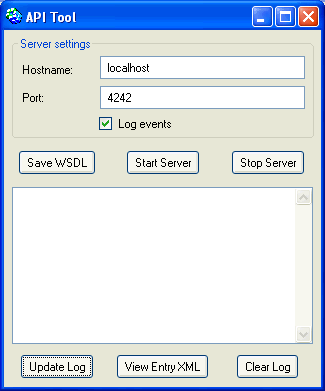
Figure 5-1. The API tool.
In the API Tool (as shown in
Figure 5-1), first press the
Save
WSDL button. This will open a file dialog asking where the
MetaEditAPI.wsdl file should be saved.
Choose the MetaEdit+ home directory (e.g.
c:\MetaEdit in our example). The WSDL
(Web Service Description Language) file contains the definitions for API
commands and as they are always the same for the current version of MetaEdit+,
you need to save this file only the first time you use the API. When the WSDL is
generated, start the API server by pressing the
Start Server button. You
can now minimize the API Tool and proceed by trying out the visual
debugger.


