This website is preserved for historical and scholarly reference and is no longer actively maintained.
2.5 Extending the Watch Modeling Language
What about the future, then? It is obvious that in real life a
modeling language like this continues to evolve, both in and of itself, and to
keep pace with changes in the domain or platform. Thus it is important to be
able to develop the DSML further according to the new requirements that may
arise. The way we developed the Watch modeling language enables us to add new
features to the language relatively easily by extending the modeling language
definitions, code generators and pre-defined Java classes. As an example on how
to extend the Watch modeling language, let us add a new Constant object type to
be used in WatchApplication diagrams and code generation support for
it.
To add a new object type, open Object Tool from the
MetaEdit+ launcher and define a new object called ‘Constant’ with
properties ‘Hours’, ‘Minutes’ and ‘Seconds’
(make sure to choose number as a data type for each of these properties). With
these definitions, the Object Tool should look like in
Figure 2-11.
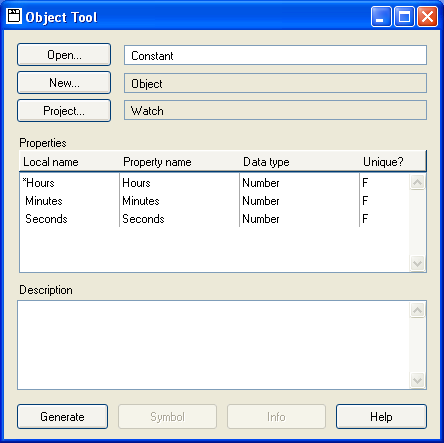
Figure 2-11. The Object Tool with 'Constant' definitions.
Confirm
the creation of the ‘Constant’ type by pressing
Generate
button. To complete the definition of new object type, we need to still create a
symbol for it. Launch the Symbol Editor by pressing the
Symbol button on
the Object Tool. Create a symbol similar to the one shown on
Figure 2-12 (you can also copy an
existing symbol like the one used for ‘Variable’ and modify it for
this purpose). Remember to save the symbol when leaving the Symbol
Editor.
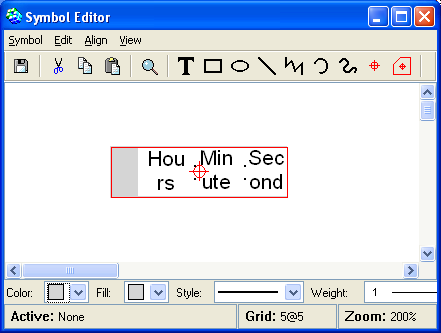
Figure 2-12. The symbol for 'Constant' object type.
The
next thing to do is to integrate this new type into our existing
WatchApplication diagram type. Open the Graph Tool from MetaEdit+ launcher and
retrieve the definitions for WatchApplication graph type. Press the
Types
button and add ‘Constant’ to the
Objects list in the Graph
types definer dialog that opens. Close the Graph types definer and press the
Bindings button in the Graph Tool to open the Graph bindings definer. In
the Graph bindings definer, connect the ‘Constant’ object type with
‘Get’, ‘Minus’ and ‘Plus’ roles in the
bindings of the ‘Alarm’ and ‘Set’ relationships (an
example of this kind of binding is shown in
Figure 2-13). Now you can create and use
Constant objects in your models.
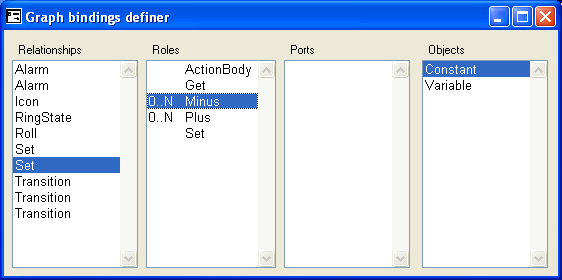
Figure 2-13. A binding with ‘Constant’ connected to ‘Minus’ role.
The
final touch to complete the addition of this new type into our modeling language
is to get the code generator to support it. Open the Report Browser for the
WatchApplication graph type and modify the ‘_calcValue’ report as
follows:
Report '_calcValue'
do ~Get.()
{  if type = 'Constant'
   then '(new METime('; :Hours; ', ';
     :Minutes; ', '; :Seconds; '))';
   else 'get'; id; '()';
   endif;
}
do ~(Minus|Plus)
{  '.me'; type;
   do .()
   {  if type = 'Constant'
      then '(new METime('; :Hours; ', ';
        :Minutes; ', '; :Seconds; '))';
      else '(get'; id; '())';
      endif;
   }
};
endreport
Accept the changes by saving the report. The
new ‘Constant’ type has been now integrated as a fully operational
part of the Watch modeling language. To try out how it works, consider the
fragment of the ‘Stopwatch’ WatchApplication diagram shown in
Figure 2-14:
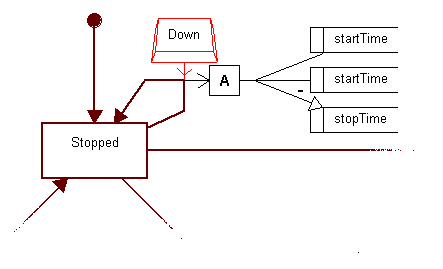
Figure 2-14. The original ‘Stopwatch’ diagram.
The
implementation of resetting the stopwatch is obviously somewhat weak: to get the
zeroed counter one has to subtract the value of the ‘startTime’
variable from itself and store it a value for ‘stopTime’ variable.
With the new ‘Constant’ type we can define this more naturally by
just assigning a constant value of zero to the ‘stopTime’ variable,
as illustrated in
Figure 2-15:
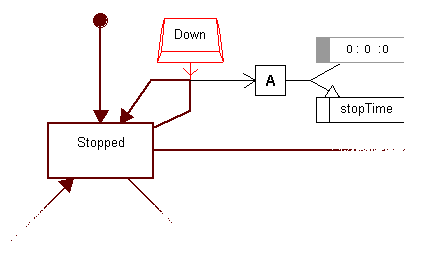
Figure 2-15. The new version of ‘Stopwatch’ diagram.
The
issue of future extensions should be recognized and taken care of during the
original design and implementation of a domain-specific language. Ease of
extension was not our primary goal while implementing the Watch modeling
language, but there are still certain ‘hooks’ for this purpose. The
main area we felt extensions would be necessary were the different operations
possible in actions. For this reason we decided to make each operation type have
its own relationship type. This allowed us to easily make bindings and
constraints specifying the rules of what arguments the operation can or must
have. Similarly, the code generation for that kind of operation is easy to add
as a new report named after the relationship type. Together, these make it very
easy to extend the modeling language with new operations.
More complex extensions usually require further additions
and modifications within the modeling language, code generator and in the
framework classes. However, as each of these have been implemented in a modular
fashion, making the required modifications should be relatively easy. Most
importantly, only one person need make the required changes, and all of the
modeling language users will benefit from them.


