updated March 18, 2026
Corrections are welcome!
The purpose of this page is to provide a timeline of the development of the on-campus network at Clemson University.
Major Sections
Highlights include:
This page is one of a series of timelines and highlights about the history of computing at Clemson University:
Note on DCIT/CCIT acronyms: the Clemson University Computer Center became part of the Division of Computing and Information Technology (DCIT) in 1985, which was renamed as Clemson Computing and Information Technology (CCIT) in 2007.
1971 - The two mainframes on campus are interconnected. Remote Job Entry (RJE) of administrative batch jobs is provided on the Business & Finance Office's S/360 Model 20 in Tillman Hall to send administrative batch jobs to the Computer Center's S/360 Model 50 in Poole Hall. See page 17 of President's Report to Board of Trustees, 1970-1971.
1972 - Dial-in access via modem for time sharing access is described as a benefit of the new S/370 Model 155 mainframe in Randy Peele, "Clemson University Computer Now Provides Dial-In Service," Anderson Independent, December 15, 1972, from the collection "Series-0037: Computer Center 1970s A," courtesy of Dr. Tara Wood, Clemson University Libraries Special Collections and Archives.
1973 - TSO use starts in April with five phone lines. See Compusion, no volume or issue number, March 1973, p. 5. [Compusion is the name of the initial set of Computer Center newsletters and is available in the Clemson University Libraries Special Collections and Archives; see this description for further details of the Computer Center/DCIT newsletters]
1974 - Batch facilities are available to students in Martin Hall, with a card reader and a line printer attached to a Mohawk Data Systems 2400. See page 37 of Annual Report of the Clemson Board of Trustees, 1973-1974. See further discussion of the Martin Hall remote below.
1975 - More than 50 public access time sharing terminals across campus. See page 43 of Annual Report of the Clemson Board of Trustees, 1974-1975:
Perhaps the most dramatic change in the usage of the computer at Clemson has been the progressive use of a time-sharing system. It is the second most significant factor in improved service. In 1972, there were no time-sharing terminals supported by the Computer Center. Any users requiring time-sharing service had to go off campus or provide their own facilities. Today there are more than 400 time-sharing users that depend on the Clemson time-sharing system, and there are more than 50 time-sharing terminals on the campus.Many of these terminals are connected by underground twisted pair wiring successfully going beyond what was thought to be maximum distance for reliable communication. See Dr. Jack Peck's reminiscence below.
See also the discussion below of two college-owned time-sharing computer labs in the College of Engineering.
1976 - There are discussions of increased remote access to the mainframe computer contained in the Annual Report of the Clemson Board of Trustees, 1975-1976. On page 34:
Computing plays a key role in the [Mathematical Sciences] department's program. The Martin Hall remote computer center is one of the most active student facilities on campus, and approximately 66 per cent of the student jobs are generated in this area by students in mathematical science classes. Over 900 times a day, mathematics students use the computer to solve problems.and on page 38:
The Computer Center has committed its resources to providing better time sharing and batch processing facilities at the University. A campus-wide terminal network has been installed and maintained by the center to provide increased accessibility to users. At present 52 terminals, seven printers and four readers are supported by this system. Software and hardware maintenance are provided solely by the center staff.See also the discussion of the Riggs Hall and Sirrine Hall remote facilities in "Utilization of Remotes," Computer Center Newsletter, vol. 3, no. 2, November 1979, p. 23. Riggs Hall had seventeen terminals and a printer.Two additional Remote Job Entry stations have been provided to meet the increasing needs of academic users. One RJE station is located in the basement of Riggs Hall to serve the College of Engineering and another is in Sirrine Hall for the College of Industrial Management and Textile Science.
1977 - There are now over 150 public access time sharing terminals on campus. See page 15 of the Graduate School Announcements, 1977-1978:
In addition to batch facilities, the University has over 150 time sharing terminals on campus. Interactive computational facilities are available for faculty and student use on both a private line and dial up basis.The main Computer Center in the basement of the R. F. Poole Agricultural Center.... Remote centers are located in Martin, Riggs, and Sirrine Halls.
1979 - A new remote facility is planned for Brackett Hall. See "Utilization of Remotes," Computer Center Newsletter, vol. 3, no. 2, November 1979, p. 23.
1981 - Remote facilities are added in the R.M. Cooper Library and at Greenville Tech. See "New and Expanded Remotes," Computer Center Newsletter, vol. 5, no. 1, September 1981, p. 23. The Clemson Student Handbook, 1981-1982, states on page 12 that "the University has more than 350 time-sharing terminals on campus."
1982 - Dave Bullard describes initial planning for an on-campus LAN in "Local Area Networks," Computer Center Newsletter, vol. 6, no. 2, Winter 1982, pp. 3-8:
The Computer Center has its own twisted pair network to most of the major buildings on campus. There is also a broadband CATV network connecting most buildings. The twisted pair network will be used to connect small nodes and the main center to the gateway processors. Initial plans call for two VAX 780's to be connected by DECNET locally and by DMA to a PDP-11 and a VAX 750 via two 1 Mbps links utilizing the coax system. ... The DEC processors will perform the necessary control, buffering and data conversion for the various types of terminal equipment.
...
Several major universities have large networks based on this equipment, the most notable being Brown's BRUNET.
1983 - Start of videotex system, available over CUFAN off campus and on campus. See Craig DeWitt, "Videotex at Clemson," ACM-SIGUCCS, 1986, pages 325-332:
There are also several dedicated videotex terminals located around the Clemson Campus. These terminals are located in appropriate, busy locations such as the cafeterias, Ice Cream Store, Intramural Sports building, student lounge and the Visitor's Center.
See an MP4 video of the DEC VTX system at Clemson University, ca. 1986, courtesy of Richard Nelson.
1984 - Discussion of plans to support student personal computers and expand public access labs from 250 to 800 terminals, moving from a ratio of about 1 terminal to 40 students to closer to 1 to 10. See "Clemson Plans Computer Expansion," The State, January 27, 1984, p. 7-A, from the collection "Series-0037: Computer Center 1980s A," courtesy of Dr. Tara Wood, Clemson University Libraries Special Collections and Archives.
1985 - Four CCIT public access microcomputer laboratories (some departments had their own). See the discussion on page 9 in Annual Report of the Clemson Board of Trustees, 1984-1985:
The Computer Center's first microcomputer laboratory, consisting of 50 DEC Rainbow microcomputers connected into the VAX network, was opened in the Library in late 1984. A second laboratory of 25 Rainbows was opened in Daniel Hall a few months later. Construction is under way on two other microcomputer laboratories in Lowry and Sirrine halls. These latter are to contain IBM PCs. Twenty Texas Instruments microcomputers have been temporarily housed in Martin Hall while space is renovated in their permanent location in Lee Hall. The demand for publicly available microcomputers is expected to continue to increase, probably at a rate equal to or greater than that for terminals. Additional microcomputer laboratories are planned.The center published a University office automation strategy which was accepted by the administration. In essence the plan calls for the installation within three years of a campuswide office automation system consistent with State and University standards. The network will be operated and maintained by the Computer Center with departments responsible for their own workstations and output devices connecting to the network. This plan is moving ahead with the installation of networked office automation systems in the computing divisions, the College of Engineering, and the College of Forest and Recreation Resources.
C.J. Duckenfield, "Director's Letter," Computer Center Newsletter, vol. 8., no. 3, Spring 1985, p. 1:
All of the Center's computers, comprising the IBM 3081 and five DEC VAX's, are interconnected. The IBM system is accessible from any terminal on the VAX network, as is any VAX computer. Software will soon be installed to permit access to the VAX network from any terminal on the IBM system, thus giving a network service in which any workstation can access any computer. The network is being upgraded to provide faster data transmission between network nodes.Also C.J. Duckenfield, "The Shape of Networks to Come," Computer Center Newsletter, same issue, pp. 3-4:
DECnet includes Ethernet, a local area network, which Clemson is increasingly using. Network efficiency is being steadily improved as networking functions are being taken away from the VAX systems and shouldered by terminal servers, routers/servers, print servers, disk clusters, and the like. Continued development of the network by means of standard DEC network software will permit high-speed access between any two nodes on the network.
1986 - Seven new CCIT public access microcomputer laboratories (several departments had their own). See the discussion on pages 61-62 in Annual Report of the Clemson Board of Trustees, 1985-1986:
The integration of the use of the microcomputer into the University curriculum has created heavy demands for public-access clusters of microcomputers for general student use. The Computer Center has generated funds to meet demand and opened seven new microcomputer laboratories in the 1985-86 academic year, giving a total of 256 microcomputers in public-access clusters. The increasing demand for such facilities, in some measure exacerbated by the fact that few Clemson students own their own microcomputers, is making it increasingly difficult to identify the funds needed to provide sufficient workstations. The University needs to encourage students to purchase their own microcomputers, thus reducing the University's expense in acquiring, maintaining, housing and supervising a vast array of equipment that must be replaced every few years. It is unlikely that many students will purchase microcomputers, however, unless they are required to or unless they can easily and inexpensively connect them to the University computing network from their dormitory rooms. A test is under way to determine the feasibility of using the University's telephone system as the connecting vehicle.
Dr. Duckenfield published "A Midyear Report" in DCIT Newsletter, vol. 9, no. 3, Spring 1986, p. 3, which includes:
All the network additions which were planned for 1985-1986 have been installed, plus a few more. In addition to pulling Ethernet cable through Martin (all sections), Kinard, Daniel, Riggs, and the P&AS Building, and connecting various buildings with fiber optic cable, both Barre and McAdams Hall have been included.The fiber optic cables run from P&AS to Daniel to Riggs. There are coaxial cable and twisted pair connections from P&AS to all campus buildings already in place. See "The Clemson University Computing Network 1985-1986," included at the end of DCIT Newsletter, vol. 9, no. 2, Winter 1986.
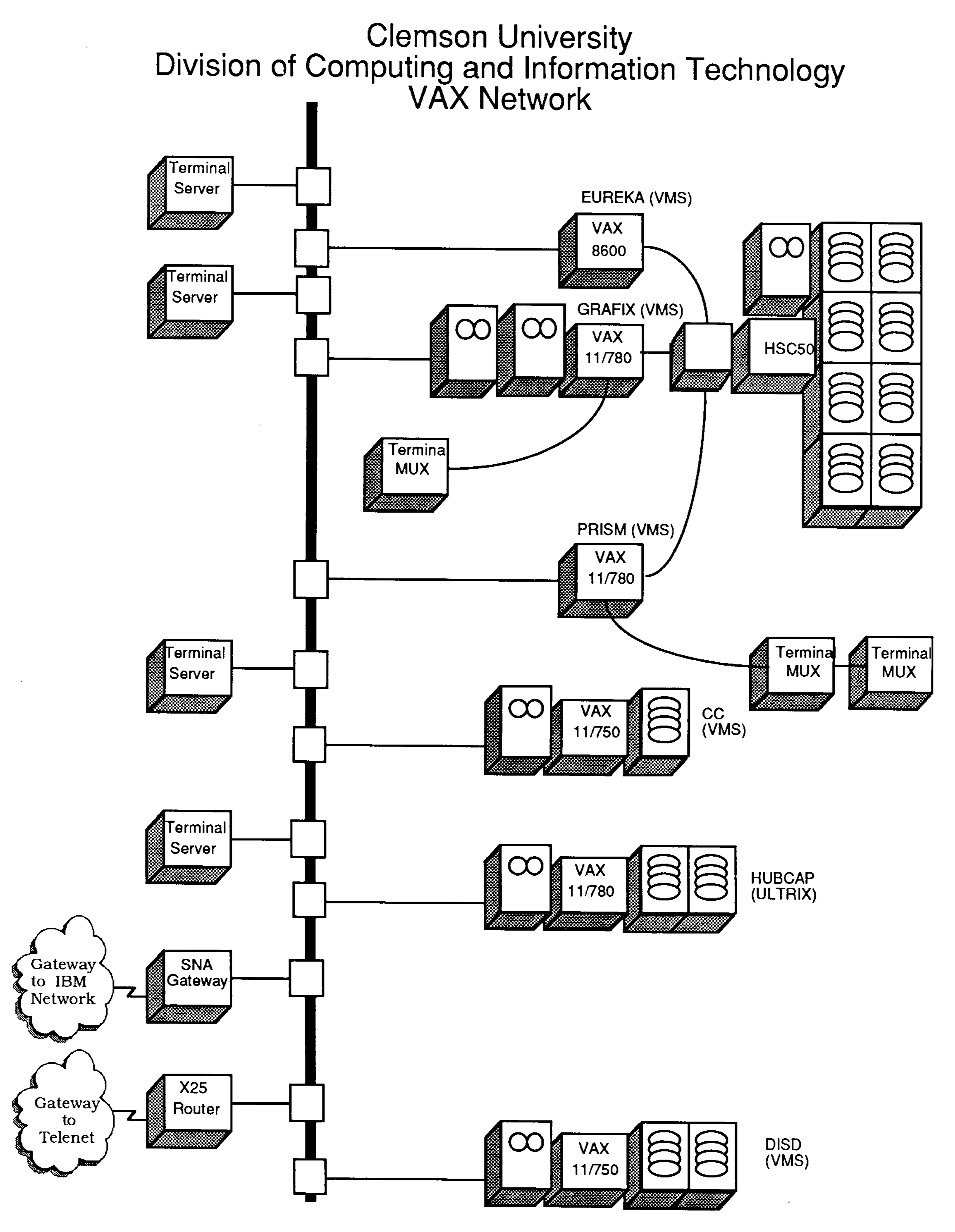
In that same issue, Richard Nelson described the VAX network, which connects the VAXcluster nodes of Eureka, Grafix, and Prism, along with nodes CC, DISD, and hubcap to terminals in Cooper Library, Lee Hall, Riggs Hall, and the main computer center in Poole Hall, All nodes except hubcap run the VMS operating systems, while hubcap runs Ultrix. The logical network map from Richard Nelson, "The Clemson University Academic Computing Network," DCIT Newsletter, vol. 9, no. 3, Spring 1986, pp. 4-5:
From Introduction to Clemson University Computer Services, 1986-1987, p. 7:
The VAX computers communicate with each other over a DECnet/Ethernet network, allowing users to access files and applications residing on all the interconnected systems. Terminals are connected via terminal servers attached to the Ethernet network. Gateways allow access to the IBM mainframe, to Telenet - a public packet-switching network, and to SURAnet, which is part of the National Science Foundation network.
1987 - starting in the fall semester all entering students received a userid for the mainframe computer. Dr. Duckenfield writes in his "Vice Provost's Letter, DCIT Newsletter, vol. 11, no. 1, Fall 1985, p. 1:
For the first time all entering students have been issued an ID and password for use on the mainframe computer. So many services are being made available to students and faculty over the computer network that it has become essential that all students have automatic computer access. The Library System, the Placement System, electronic mail, and the University Calendar, are just a few of the services available over the network. We have found great enthusiasm among students and faculty for the concept of giving everyone a computer ID and expect that it will lead to an improvement in the efficiency of a variety of services provided by the University.
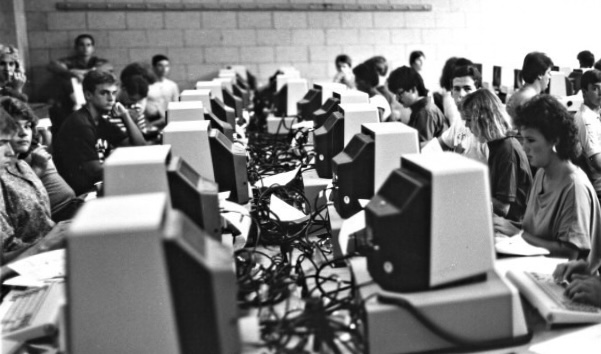
Several computer labs are described and pictured by Nicholas Bogdin and Johnny Wood, respectively, in the 1987 TAPS yearbook, "All Types of Computers for all Types of Students," pp. 110-113. The picture below was taken in one of the Martin Hall labs with IBM 3178 Display Stations (which are mainframe terminals rather than PCs):
The following picture of CPSC 120 students using IBM PCs in the Kinard Hall lab appeared in both the yearbook article and also in an article almost thirty years later by Benj Edwards, "9 Awesome Photos of School Computer Labs from the 1980s," PC World, August 20, 2015: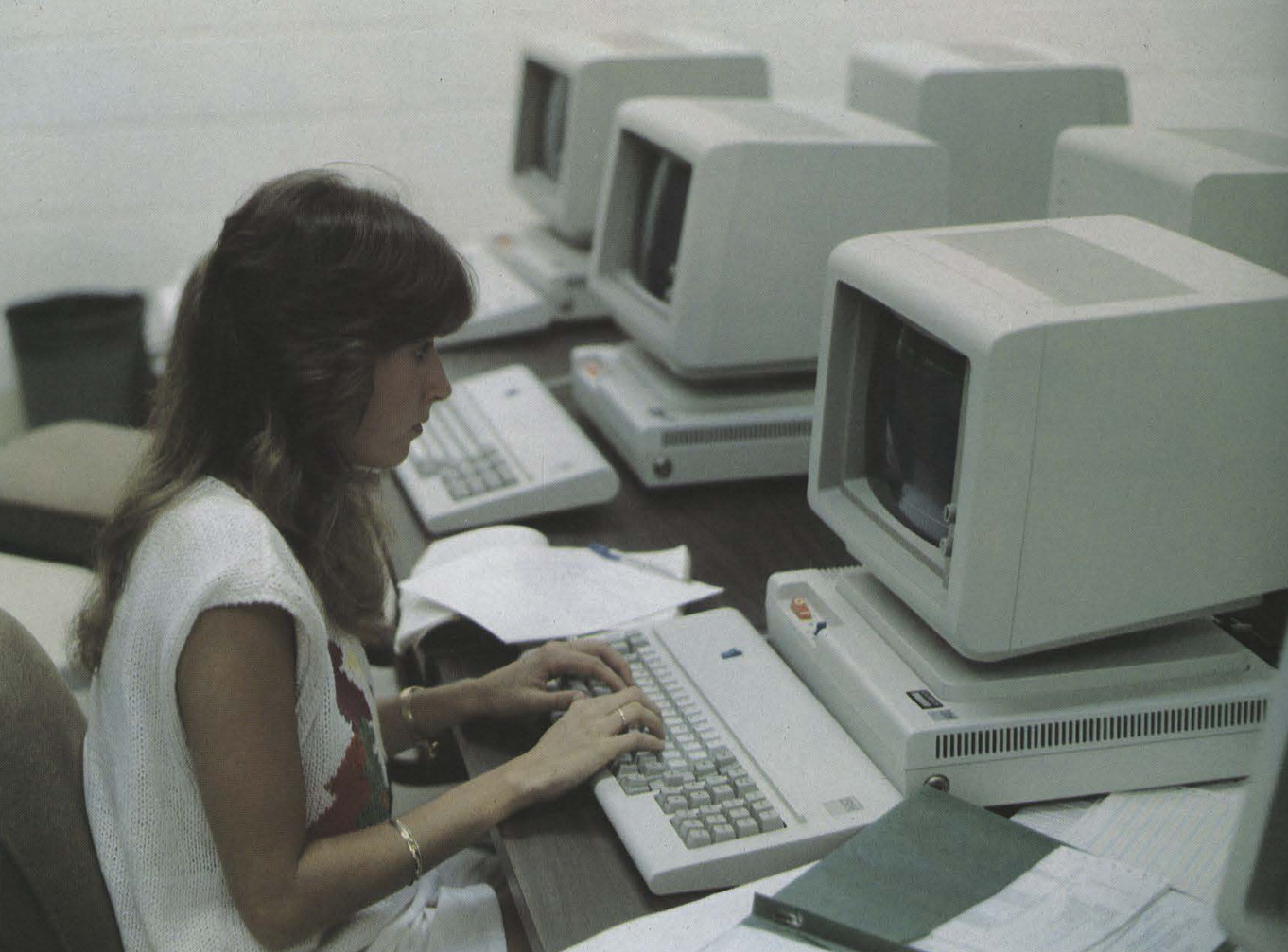
Over the Thanksgiving break, the Clemson University mainframe is moved to the new Information Technology Center (ITC), ten miles away from campus. Cables and communications equipment, including four T-1 multiplexers, were also installed to handle over 120 communication lines that were connected to the computer center in Poole Hall and that now needed to be routed to the ITC. See Chandler Robinson, "The Big Move: A Network Perspective," DCIT Newsletter, vol. 11, no. 3, Spring/Summer 1988, pp. 13-16.
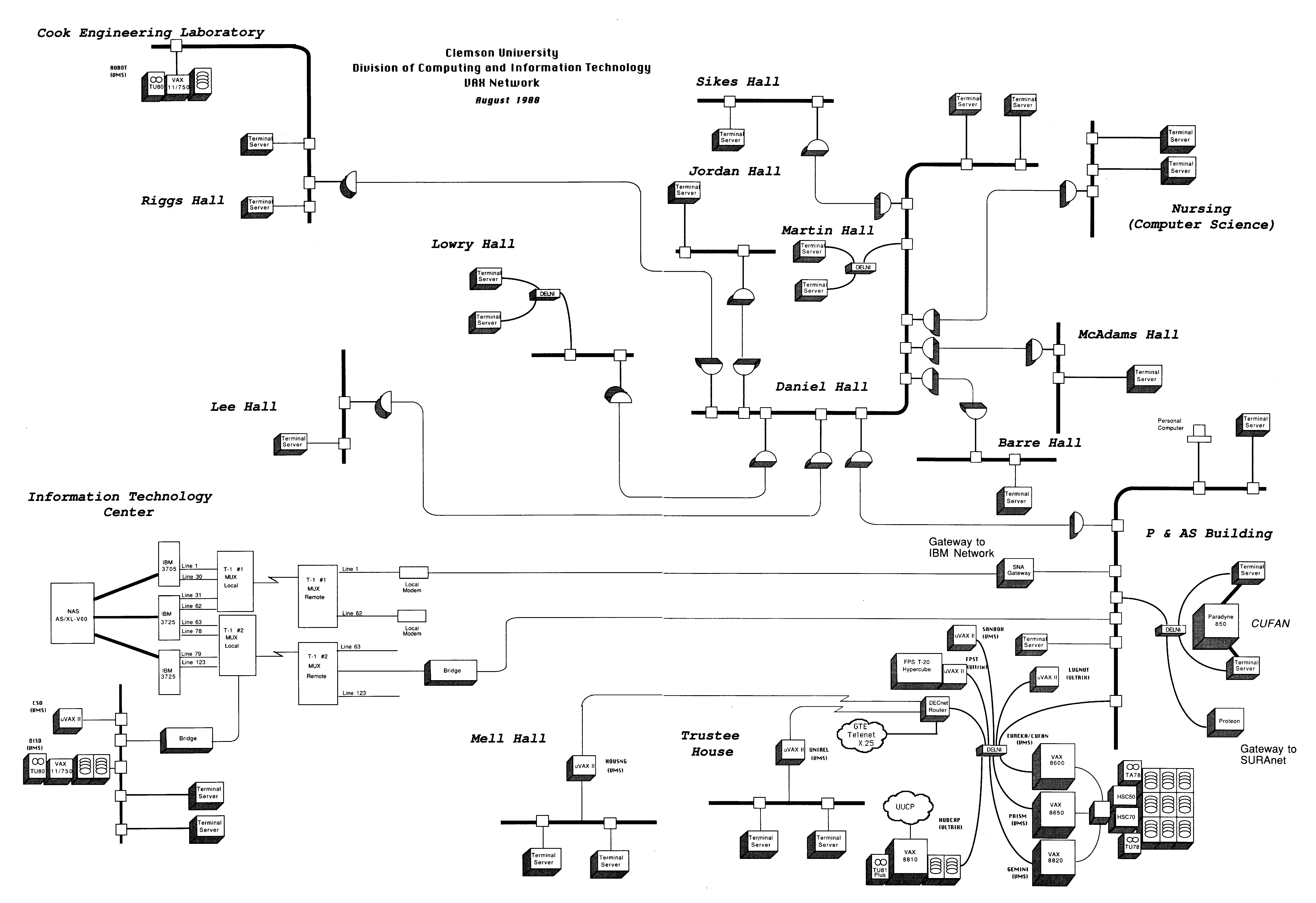
1988 - A connection map of the VAX network is given on pages 10-11 in DCIT Update Newsletter, vol. 12, no. 2, November 1988:
1990 - From Introduction to Clemson University Computer Services, 1990-1991, p. 38:
All DCIT Ethernet networks are designed using Digital Equipment Corporation (DEC) design rules and guidelines.Also, in Dave Bullard, "Maintaining the Ethernet," DCIT Update Newsletter, vol. 14. no. 1, September 1990, p. 6, a policy is announced that DCIT will not support departmental Ethernet equipment that is not manufactured by DEC.
Dial-in lines for the mainframe and for the VAX systems are increased from ten each to sixteen each. See Chandler Robinson, "Network News: MVS Mainframe and VAX System Dial-up Upgraded," DCIT Update Newsletter, vol. 14. no. 1, September 1990, p. 5.
1994 - Dave Bullard, "Beefing Up the Network for Distributed Computing," DCIT Update Newsletter, vol 17., no 4, March 1994, pp. 4-5:
DCIT has installed some large routers on the LAN, including the fiber between campus and the Research Park, and this hardware improves the bandwidth in two ways. First, the routers separate the LAN into many individual Ethernets, so most buildings have the total 10 Mbps segment to themselves rather than sharing it across campus. Second, the routers communicate with each other using FDDI (Fiber Distributed Data Interface). FDDI operates at 100 Mbps with a usable bandwidth of 80-90 Mbps in a campus environment. (DCIT is also planning for an FDDI network just to connect departmental servers to the main data repository, so disk backups, software distribution and server to server communication won't impact the interactive user network.) In a few years FDDI or 100 Mbps Ethernet will be in every building and even on some desktops. Or maybe something faster will be there.
1995 - Cable and fiber optic lines are being installed in east campus dormitories (Smith, Barnett, Manning, Lever, Mauldin, and Byrnes) to provide cable TV as well as campus network connections without needing a modem. See references below.
Novell Netware is installed for labs. See Scott Hammel, "Computer Lab Changes," computing@clemson.edu Newsletter, vol. 1, no. 1, January 1996, pp. 1-2:
In the last six months, DCIT has made many changes in its public access computer labs. What exactly has changed and why?NEW NETWORK OPERATING SYSTEM
In order to answer the demands of client/server technology today, DCIT replaced the network operating system servicing the labs. We initially ran Digital PathWorks and are now running Novell Netware V4.1. PathWorks also served as a router for the labs' subnets. In order to provide that functionality most effectively, we installed separate machines to perform routing for the labs. Along with the server software changes, the client software changed as well.
...
MORE INTERNET ACCESS
Finally, we opened up access from the lab machines to the Internet. Prior to the fall semester, lab machines could only directly access such things as Web servers and ftp servers on campus.
...
Our goal is to create a seamless network environment that allows users to move freely from place to place with as little restriction as possible to hardware platform or geographic location while providing full access to Clemson and worldwide network resources. To do this we had to define our network globally instead of locally. Netware 4 most readily and effectively permits a global network strategy.LOGGING IN
In order to add functionality such as utilizing a central post office for e-mail, World Wide Web access from labs, etc., we had to provide a means of tracking activity on the Internet originating from Clemson University and tying it to specific users. We also had to provide centralized, globally accessible data space for every person affiliated with Clemson University that is private and password protected. This space is required for implementing such things as e-mail server clients in the labs, personalized Windows desktops, etc.
...
NETWORK DISK SPACE
When you login to the network you have 5 megabytes of disk space available to you on a centralized server, and wherever you login you are connected to your data space. This is where your e-mail mailboxes reside, your Windows preferences, etc. You can also store anything you want to keep here as well, such as Word documents or 123 spreadsheets (up to 5 megabytes!). This space is protected by network security and is only available via your user ID and password, so other users cannot look into it unless you permit them to look there.
1996 - Additional applications incorporate the common authentication services. See "Changes Made in Passwords," The Tiger Guide to Clemson, special issue of The Tiger, August 22, 1996, p. 15:
On the weekend of June 29, the Department of Computer and Information Technology (DCIT) implemented system changes that cause password checking for MVS mainframe sign-ons and mail server mail requests to be handled by a Novell Netware server. The MVS mainframe, the mail server and Netware all use the same password for each user ID.You will now use the same password to log in to Netware in the labs or in the office, to TSO, SIS, EIS or mainframe administrative systems and for checking your e-mail with Eudora or Pegasus. In the near future, expect to see Web-based applications that use your common user ID and passwords as well.
These authentication services are part of the lab standardization effort discussed above. See also Scott Hammel, "Lab Standardization," computing@clemson.edu Newsletter, vol. 2, no. 2, Fall 1996, pp. 4-5.
In an effort to bring a similar computing environment to labs around campus, many departments and colleges have conformed their labs to a new standard.
...
The key to providing this kind of individualized computing environment lies in providing each computer user with password protected network disk space where configuration files, data files, e-mail mail boxes, etc., can be stored. As long as all lab computers interpret the events that occur as a user logs in the same way, the proper connections will be made such that the custom environment and files will be made available in the same way in any lab.Just some of the benefits related to a standard lab environment at Clemson are as follows:
- password protected, network storage space for everyone at Clemson (20 Mb for students, 100 Mb for employees)
- workstation e-mail clients, such as Eudora
- customizable desktops for Windows, and hopefully for the Mac by next fall
- single network login rather than different logins for each network resource
- one user ID and password for all network resources
- collaborative storage for group projects and exchange of data between students and employees
- automatic default printer setup based on location
- identical software and versions from lab to lab
- simplified logins
- consistency between labs so that only one environment has to be learned in order to get work done.
An announcement is made that access to the VMS systems and DECnet support will be withdrawn in summer 1997. See Dave Bullard, "Many Products and Protocols No Longer Considered Strategic," computing@clemson.edu Newsletter, vol. 2, no. 2, Fall 1996, pp. 4-5.
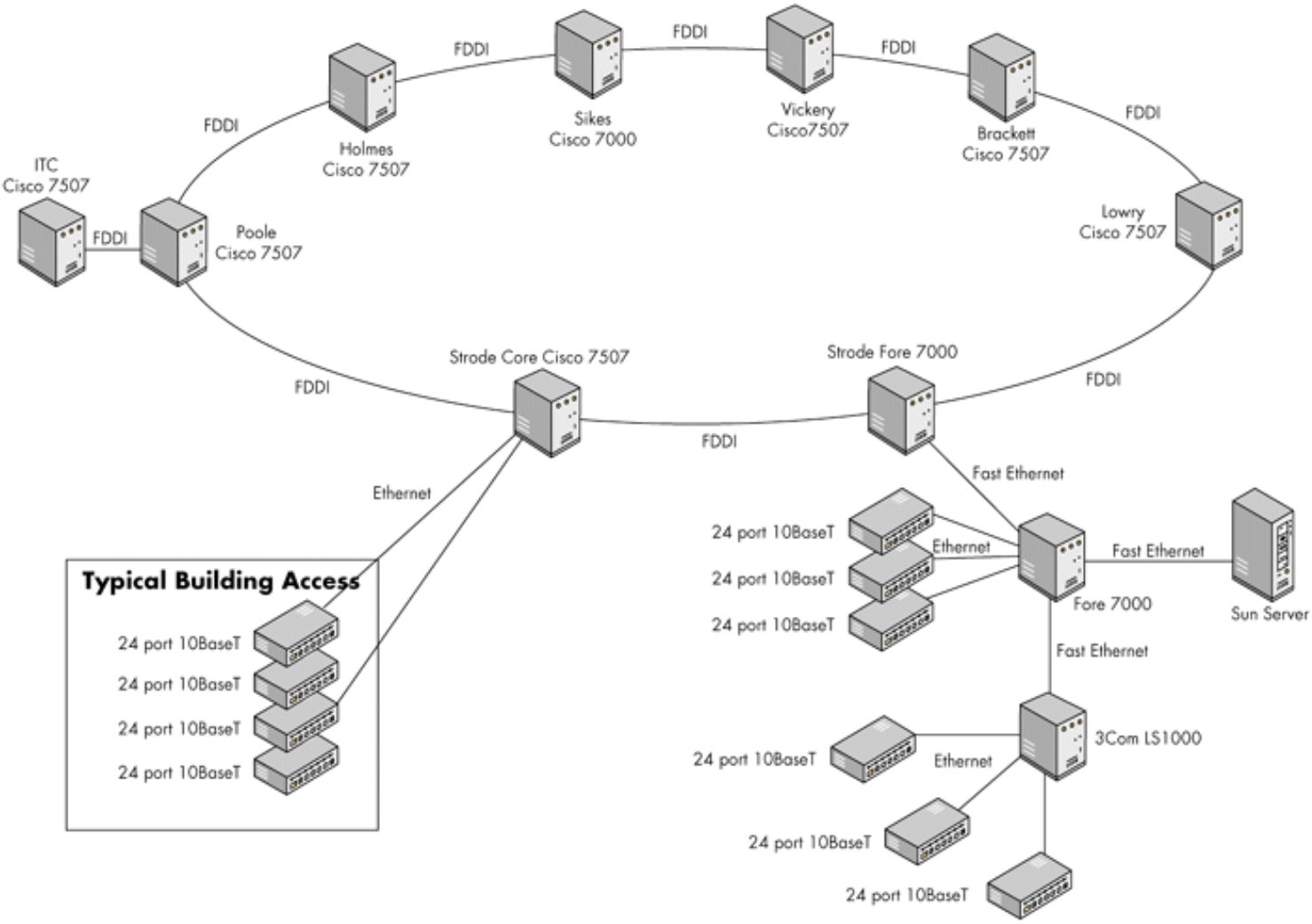
1997 - The 100 Mbps fiber optic backbone network using FDDI (Fiber Distributed Data Interface) operating in 1997 is described and pictured in David Condrey, et al., "Implementing NDS-Enabled Solutions at Clemson University," Novell App Notes, July 7, 1998:
The backbone is composed of a central ring and two smaller rings. One small ring serves the College of Engineering and Science buildings, and the other is essentially a point-to-point connection to Clemson Research Park. The Information Technology Center, the largest campus data center, is located in the Clemson Research Park.Building networks connect to the backbone at one of eight locations. Each location is a fiber hub site, with a large Cisco router serving all the buildings in that area of campus. Only TCP/IP and IPX protocols are allowed to transverse the backbone. A parallel OC-12 ATM backbone is being constructed to support Internet2 networking requirements.
Clemson's data network is designed to minimize data leaving a building, so there is often a server located in the building to store commonly used applications and departmental data and to handle local printing. There are over fifty of these servers on the network. Large computer labs usually have their own server because of the high traffic levels. Because everyone in the building shares this server and because many of the applications are fairly large, the server is usually connected to the Ethernet switch by a Fast Ethernet of 100 Mbps bandwidth. There is also a 10 Mbps or 100 Mbps switched Ethernet link leaving the building to connect to a backbone router.
The Ethernet switch also connects many 10BaseT hubs to the building network. In some locations, powerful workstations have their own switched Ethernet segment rather than sharing a segment within a 10BaseT hub. To prevent snooping, hubs are set to transmit network traffic only for the Medium Access Control address of the workstation attached to each port.
See also "Special Reference Edition, Networking at Clemson," computing@clemson.edu Newsletter, vol. 2, no. 3, 1997.
DCIT upgraded classrooms with special technology-laden lecterns to turn the rooms into "smart classrooms" connected to the campus network. See Chuck Heck, "DCIT Installs First of Many Smart Classrooms," computing@clemson.edu Newsletter, vol. 3, no. 3, Spring 1998, pp. 6-7. See additional references below.
1999 - AuthServ (authentication services) and CLE (Clemson Learning Environment), a learning management system, are announced as winners in the Novell Developers' Contest at the Networld trade show. AuthServ won as the Best Commercial Application, and CLE won as the Best Overall Custom Application. See C.J. Duckenfield, "Clemson Computing Gets Worldwide Attention," computing@clemson.edu Newsletter, vol. 5, no. 2, Winter 1999, p. 2. The success of AuthServ led to the spinoff of Omnibond Systems as a startup company in 1999 and a partnership with Novell in 2000. See the AuthServ entry on the web page of Example Software Systems Developed at Clemson University.
Experiments begin with wireless LANs, including connecting the Ravenel Center to the campus network. See Chandler Robinson, "Networking Unplugged," computing@clemson.edu Newsletter, vol. 6, no. 2, Winter 2000, p. 3, and Chandler Robinson, "Wireless Communications at Clemson University: An Update," computing@clemson.edu Newsletter, vol. 6, no. 3, Spring 2001, p. 4.
2000 - Approximately 3,500 PCs and workstations are connected to the campus FDDI/Ethernet backbone; see page 8 of Clemson University Undergraduate Announcements, 2000-2001.
Dan Schmiedt, The CU Network and What It Can Do for You!," computing@clemson.edu Newsletter, vol. 6, no. 1, pp. 5, 7:
Currently, Clemson's network consists of about 18 "core" Cisco enterprise-class routers connected together with Gigabit (1000 megabits per second) Ethernet and FDDI (Fiber Distributed Data Interface). These routers direct traffic to and from core network sites to which most campus buildings are connected. We connect to the rest of the world via ATM (Asynchronous Transfer Mode), both to the Internet and the Abilene Internet II research network.
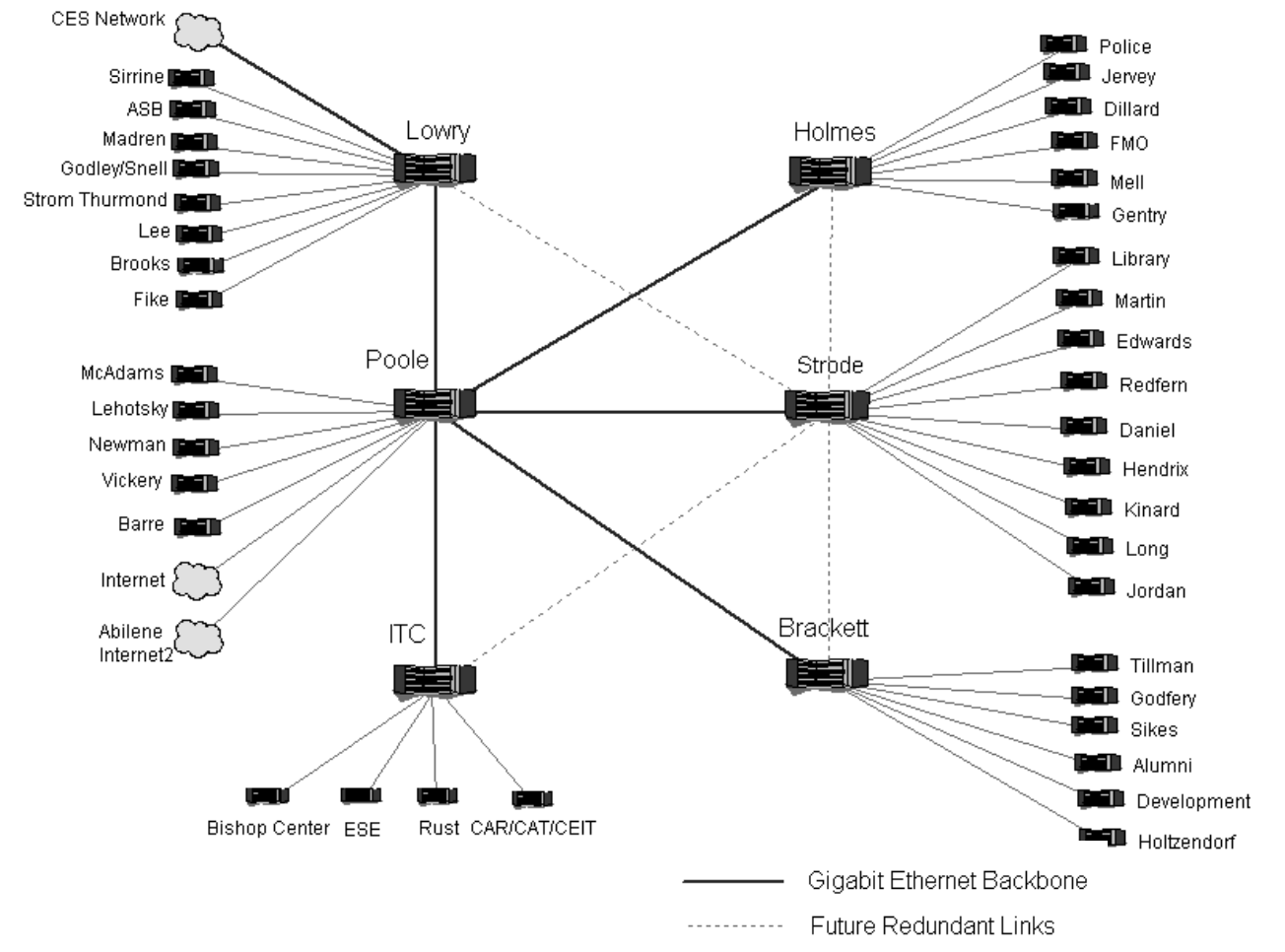
2001 - New Gigabit Ethernet backbone network. See Dan Schmiedt, "Clemson Gets Network Upgrades," computing@clemson.edu Newsletter, vol. 7, no. 1, Fall 2001, p. 6:
This summer, we have removed all of the remaining FDDI backbone and related equipment, and have replaced it with an all Gigabit (1000Mb/s) network core, with the routing and switching done by Cisco Catalyst 6500 and 5500 Enterprise network switches.
Also, see Dan's article on "Wireless Networking Now Available," in that same issue on pp. 10-11.
The Board of Trustees approves a proposal that freshmen in the College of Engineering and Science and the College of Business and Behavioral Sciences will be required to have a laptop for Fall 2002. This will later become a requirement for all majors. See C.J. Duckenfield, "Board of Trustees Approves Laptop Mandate," computing@clemson.edu Newsletter, vol. 7, no. 2, Winter 2001, p. 1, which includes:
DCIT had anticipated the gradual ascendancy of laptop over desktop computers, particularly for students, and has been installing wireless data communications capability around campus for some time. This will continue over the next year and the entire campus network is being redesigned to incorporate wireless computing.
2004 - National recognition of Clemson University's wired and wireless campus networks is described on p. 32 of the President's Report to Board of Trustees, 2004:
Most wired/unwired campusClemson is consistently regarded as one of the country's most "wired" and "unwired" universities. To prepare for Clemson's requirement that all students own and use a laptop, Clemson's Division of Computing and Information Technology began in 2000 to ensure wireless access across campus. Today nearly every campus building, except student dormitories, has wireless access.
"We installed wired access in the dorms, because the bandwidth is much greater with wire," says David Bullard, interim vice provost. "But even without wireless in the dorms, the access is very robust. For every bed in every dorm, we have a 100 MB network port-which means students never have to wait to go online."
In 2003, The Princeton Review names Clemson "among the top most wired college and university campuses in the country." A year later, Clemson is ranked 31st among the country's top 100 schools for wireless computing access in Intel's Most Unwired College Campuses.
All entering freshmen as well as some or all upperclassman in several colleges are required to have laptops for Fall 2004. See Laurie Sherrod, "Laptop Updates for 2004," computing@clemson.edu Newsletter, vol. 9, no. 3, Spring 2004, pp. 1-2.
2007 - Under the leadership of the recently arrived CIO, Jim Bottum, and CTO, Jim Pepin, CCIT and the Computer and Network Services (CNS) unit of the College of Engineering and Science merge their efforts and refresh the campus network. Budget documents show a $2.18M investment in network upgrades in FY08 and FY09. A description of the combined effort says, "This project will include an upgrade of the floor, building, core switching and routing platforms." [Unfortunately it appears that the pdfs of the project presentations and progress reports linked from archived pages such as this one were not captured.]
The Network Operations Center (NOC) opens in November 2007. See also a CCIT video tour of the ITC and NOC, ca. 2008.
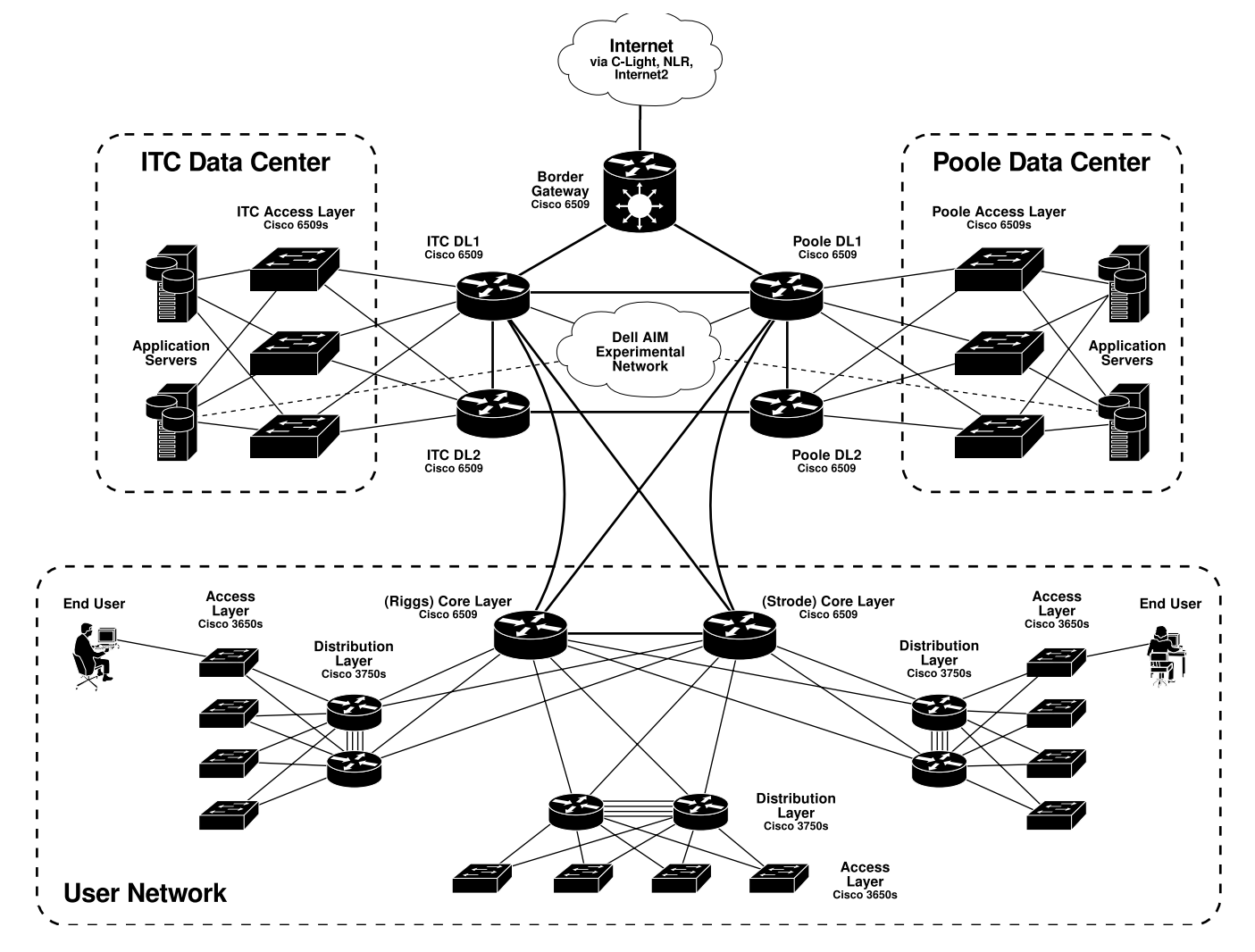
2012 - Description of the campus network from Benjamin Ujcich, et al., "Thoughts on the Internet Architecture from a Modern Enterprise Network Outage," IEEE Network Operations and Management Symposium, 2012, pp. 494-497:
The Clemson network is designed in the pattern of a Cisco hierarchical internetworking model with three tiers: core layer (CL), distribution layer (DL), and access layer (AL).The Clemson campus network consists of two data center networks (Poole/ITC buildings) and one user network (serving students, faculty, and staff). As shown in Fig. 1, the border gateway router and the three networks are interconnected via four DL switches. Redundancy is a top priority for the campus network. The campus DL, user network CL, and user network DL switches are all provisioned with dual redundancy.
The various parts of the campus network include:
- Campus DL: Four Cisco 6509 routers make up the campus DL (two per data center in a redundant pair). Each DL1 is connected to the border gateway, data center AL, and user network CL switches.
- Data Center AL: Multiple Cisco 6509 switches connect application servers in the data network.
- User Network CL, DL, AL: Two Cisco 6509 routers form the user network core. Each campus building has a stack of two DL switches providing dual aggregated links to each AL switch. Each stack then has a fiber link to both CL switches.
Kuang-Ching "KC" Wang, a faculty member in the Electrical and Computer Engineering Department, partners with CCIT to establish Clemson NextNet with a NSF Campus Cyberinfrastructure award (award number 1245936) to explore production use of the emerging software defined networking (SDN) technology for high performance data transfer on campus (across the campus backbone and between 10 academic buildings) and off-campus over Internet2.
2014 - From the 2013-2014 CCIT assessment report:
The campus wireless network was upgraded to allow users to operate at a maximum per-client net data rate from 54 Mb/s to 600 Mb/s, which is approximately 5 times faster than the previous capability. Also, additional wireless access points were installed to provide better coverage in several campus buildings. The group also implemented Eduroam as a configuration on the campus wireless network.... High speed fiber connectivity was also installed at campus farms and labs that previously had either no connectivity or limited outdoor wireless connectivity - including the Outdoor Lab, LeMaster Dairy, Peck Poultry Center, Garrison Arena, Swine Farm, and the Equestrian Center. ... At any given time during the Spring Semester (2014), there were more than 18,000 devices connected to Clemson's wireless network (eduroam).
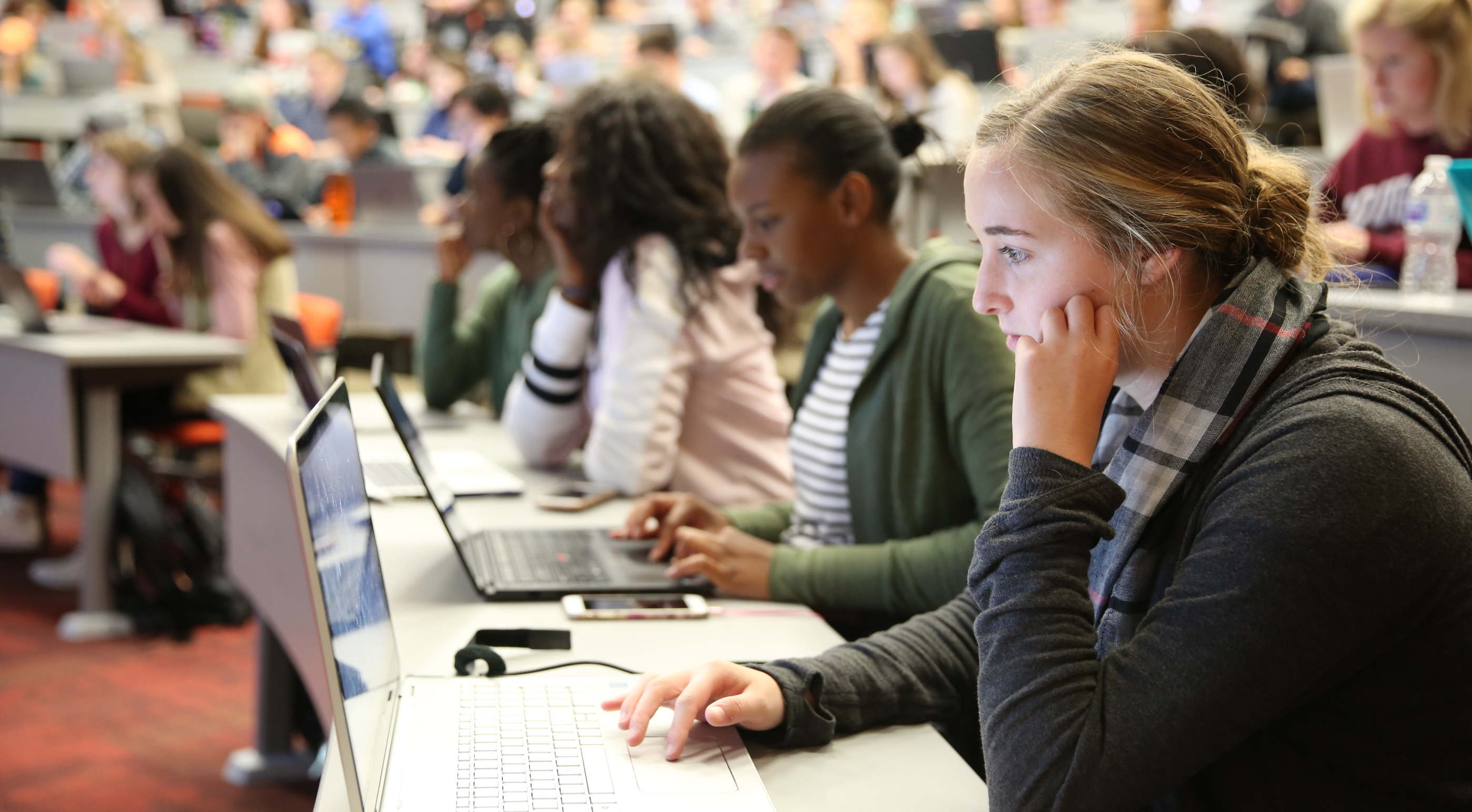
ca. 2017 - Clemson University publicity photo of students with laptops in a classroom using the wireless network:
2025 - CCIT description of wired access on campus:
At the core of Clemson's local area network are two fully redundant, 100 Gbps-connected Juniper QFX10008's. These have multiple 40 Gbps-connected links to Cisco Nexus 7700's in diverse campus locations. The Nexus switches aggregate dual 10 Gbps connections from Cisco 9300 switch stacks that serve as building network distribution and access switches. The multi-gigabit Cisco 9300s allow end user connections of up to 5 Gbps. This network design has zero single points of failure in the core and distribution layers, is consistent across Clemson's entire campus, is easy to troubleshoot, and behaves deterministically, should link or equipment failure occur.
CCIT description of wireless access on campus:
The university's wireless network is one of the largest in the country with approximately 5,300 access points providing convenient wireless access in almost all campus buildings, including every academic building and residence halls.
Stringing Underground Connections in 1975
After Russell [Schouest] became Computer Center Director [in 1975], he installed the first networked, remote computing system (TSO) using asynchronous terminals (running at 1200 bps) and ran twisted pairs of wires from the P&AS building to Martin Hall and Riggs Hall through utility tunnels that run all over the campus.
College of Engineering Time-Sharing Labs in 1975
Modern methods of individualized instruction are being used by all departments in the College of Engineering. A special laboratory with 32 student stations, developed during 1974-75, will be doubled in size during 1975-76. Professor Gilbert Rainey from Purdue, a national authority in individualized instruction, was on campus last year designing a complete facility which assisted the College in its efforts in this area. One-third of all Engineering students were involved with these improved instructional methods.The College's computer capabilities remain among the strongest in the Southeast and will be significantly expanded again this year through a $20,000 equipment grant from the National Science Foundation. Computer facilities include a powerful real-time/hybrid system, an interactive conversational computer system, a timeshared system and 10 other micro- and minicomputer devoted to instructional and research activities. Clemson is a recognized leader in the applications of computers in Engineering with a strong faculty and more than $1 million in state-of-the-art equipment, almost all of which was purchased from Federal and private grants and contracts.
The College has increased its interactive computer-based instructional capability by establishing a second "computer classroom." A total of 30 stations are available for individual or class study in most Engineering disciplines. The College has acquired, through a special grant, one of the first "Classic" (Classroom Interactive Computer) terminals produced in the nation. The terminal is one of the easiest-to-use, lowest-cost programmable computer instruction systems currently available.
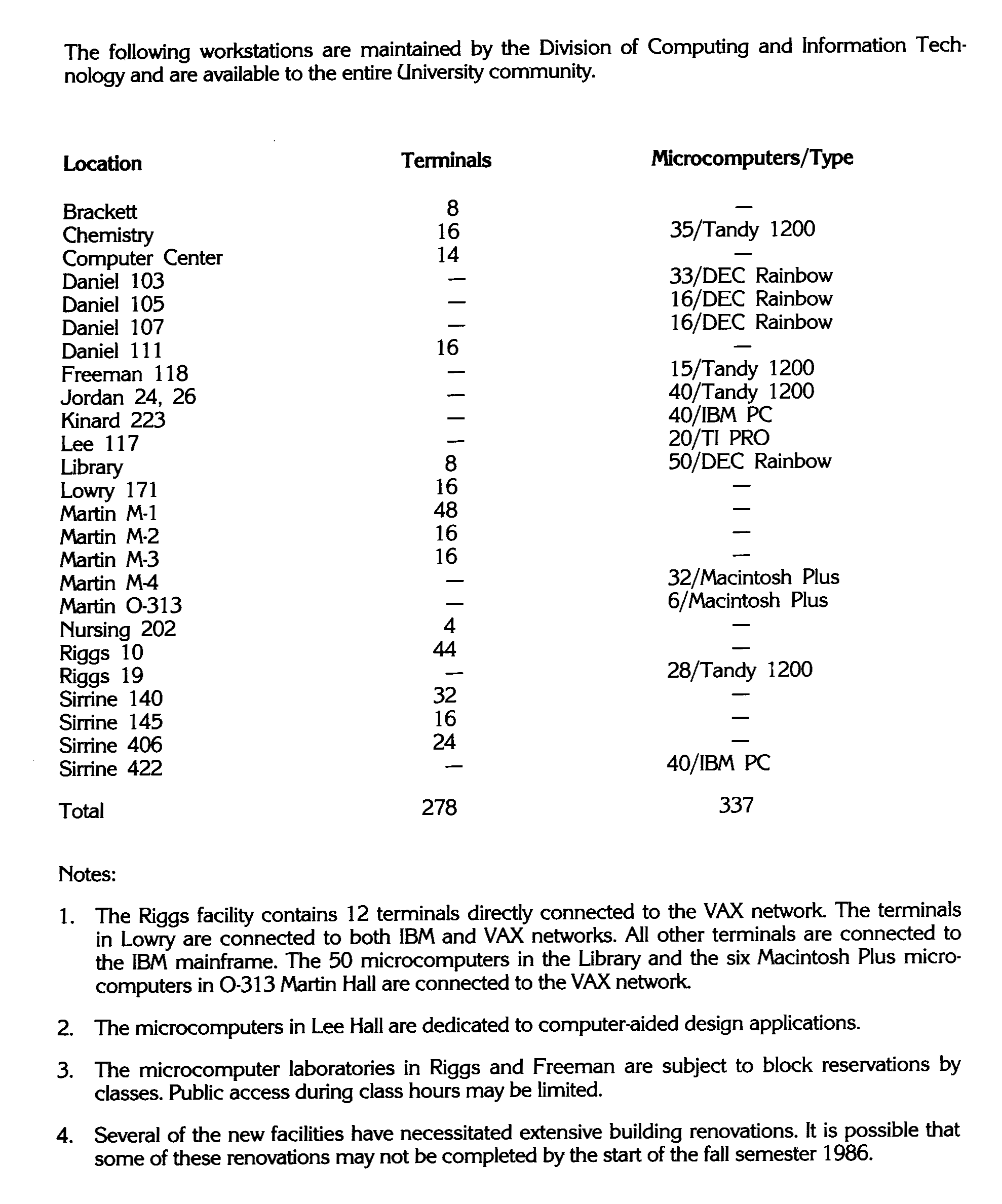
Lists of Public Computer Labs
You have access to terminal and microcomputer clusters in Poole Agricultural Center, Martin, Sirrine, Riggs, Brackett, Lee, Kinard and Daniel halls, the Cooper Library and Greenville Tech. Many departments have their own terminals for use by their faculty and students.and the hours of operation are on the Answer Sheet (page 70 of the pdf):
The list of computer lab locations also appeared in the 1986-1987 Undergraduate Catalog and the 1986-1987 Graduate School Catalog. Note that, because of publishing deadlines, the set of locations printed in the student handbooks and catalogs would typically be locations available the previous spring semester and omit labs that were newly opened in the summer and fall.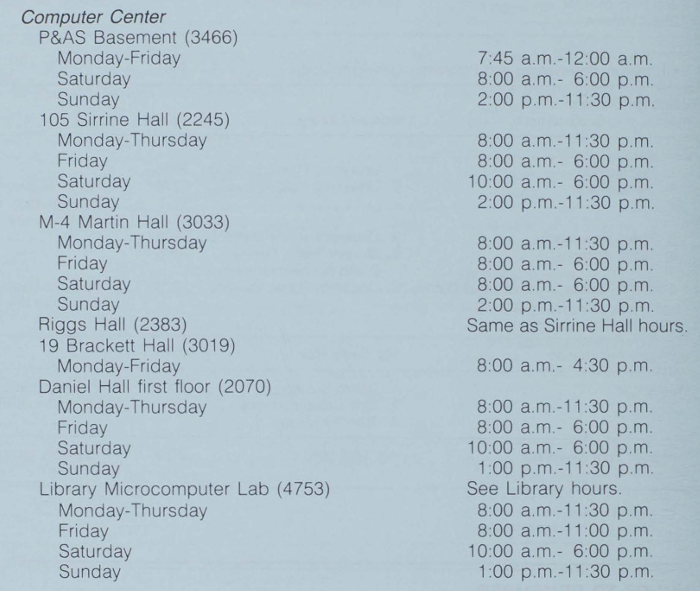
Wiring Dormitories Beginning in 1995
Virtual Versus Physical Laptops, ca. 1995 to 2001
CLEMSON RETAINS ITS COMPUTING LEADERSHIP POSITION
Clemson has emerged as a national leader in providing fully-networked, publicly accessible computing services to its students. Clemson has implemented, and has been steadily improving for the past two years, what others have only dreamed of: a "virtual" computing environment in which a student, merely by identifying himself to the network, gains access to a personalized array of services no matter where in the network the student happens to be.Most universities can claim to have networked computers. Clemson takes the definition of "networked" several steps further. The networks in most universities are, in fact, a conglomeration of semi-independent networks. Users connected to one of these subnetworks are typically known only to that subnet and are not provided a view of, nor are they known to, the network as a whole. At Clemson there is an umbrella network to which users connect. Under this umbrella they are allowed access to a range of services across the entire network tailored to the individual.
Clemson has implemented true networked, client/server computing. Clemson computer users identify themselves to the network, not to any particular computer, and the network "authenticates" them. This authentication process determines what network services the user is authorized to use and allows access to those services. Use of specific network devices, such as printers, can be allowed or disallowed; access to specific computers attached to the network can be authorized or not; and hacking is all but eliminated because the network knows who is doing what.
The advantages of this approach to networked computing are most evident in the microcomputer laboratories through which most students access Clemson's computing services. The microcomputer laboratory environment is designed so that the user, in moving from machine to machine and from lab to lab, can be sure that the desktop always looks the same to that user, no matter how it has been personally configured; that access to services remains consistent; and that documents or data files look the same at each workstation no matter what changes have been made to them or where.
No longer is it necessary for the student to carry data around on diskettes. Data is now stored on the network, is accessible from any workstation, is automatically backed up, and can be shared with other users if the owner allows. Printing can be performed on any network printer that the student's network profile authorizes, and electronic mail can be sent from and received through any workstation.
The concept of a standard lab environment has made it possible for the Division of Computing and Information Technology (DCIT) to efficiently provide technical support for college labs in addition to DCIT labs without increasing staff. Labs running this standard environment all look alike to the user. The desktops, the software available, and the range of services to which the user has access are consistent across the labs. Clemson students do not have to face a different operating environment depending upon whether the lab is managed by DCIT or by one of the colleges.
At a time when universities have started requiring students to bring laptop computers to school, Clemson University bucks the trend. It has established what it calls a network of "virtual laptops."In 33 labs across campus, Clemson provides nearly 800 computers that can be configured to suit each user's tastes. When a student logs on, the computer will bring up a screen designed for her, as well as folders for e-mail and class syllabi.
"You never have to buy your own machine," says Chris Duckenfield, Vice Provost for Computing and Information Technology. "You don't have to lug it around. Nobody's going to steal it.
"It's unfair to require the students to spend all this money, and they're going to have to replace (an obsolete computer) in two years," Duckenfield says.
"I think a lot of universities require laptops ... just so they can say the curriculum is forward-thinking."
After three years of testing, Clemson has just completed a limited, first year of using virtual laptops - the only such program in the country. Now, it's testing the idea of setting up "collaborative learning" work groups, linking groups of students taking the same classes.
...
All of the units in Clemson's common labs are loaded with such Microsoft products as Word and Excel. All provide unlimited Internet access, at the university's expense. Each lab also has a number of printers and nearly unlimited paper.Each student has 20 megabytes of personal memory. And each student can set up her own Web site.
Why would CES, and maybe other colleges, even the whole university, want to institute such a program?THE COST
Not to save money. There is no expectation that the university is going to save money by shifting the burden of computer purchases to the students. In fact, most of the major DCIT public access labs would remain, even if all Clemson students owned laptops. The network infrastructure and support costs - wireless computing, more smart classrooms, increased consulting and Help Desk requirements, and a vastly expanded repair facility - will make supporting an extensive laptop program, often referred to as "ubiquitous computing," considerably more expensive than the computing support model that has served Clemson well for some years.At Clemson most students already own a computer, though relatively few own laptops. The combination of student-owned machines and the "virtual laptop" lab environment provides all students with ready access to the level of computing service that is required to support most instructional methodologies in use today. Requiring every student to own a computer, not necessarily a laptop, would add nothing in terms of quality of instruction or learning and minimal PR benefits.
THE TECHNOLOGY
If, on the other hand, it could be assumed that all students had a laptop computer in their possession at all times, then a whole new range of teaching and learning techniques would be opened up. An environment in which every student had a laptop would potentially be very different from that in which we operate today, today's environment being functionally the equivalent of one in which every student owns a computer.Clemson processes over two million email messages a day, has the world's largest number of active listservs, and makes use of the Collaborative Learning Environment (CLE) across the curriculum, so technology is already a major part of the university's academic life. Nevertheless, a laptop program would provide further impetus for utilization of information technology in the teaching and learning processes, and greater utilization of such aids to collaboration as the CLE. It has the potential to contribute substantially towards releasing the creative talents of Clemson faculty and students.
The Clemson Laptop ProgramSee also Laurie Sherrod, "Clemson University Pilot Laptop Program, 1998-2000".This is being written in 2025 about events that began in 1998, so please forgive the author if my memory is not perfect. On the other hand, the topic is near and dear to my heart, so I'm 98% sure of most of it.
When the decision was made to bring laptops to Clemson, a large committee was formed, known as the Laptop Committee (mostly faculty). It did include a few CCIT employees. This included Chuck Heck whose responsibility was Smart Classrooms, Jon Hoskin who was a former faculty member then doing tech support, and Bobby Clark who represented client support. A smaller subset was referred to as the small committee, but it essentially functioned as an executive or technical committee. The small committee consisted of the Associate Dean of the College of Engineering and Science (Steve Melsheimer), Professor of Math (Bill Moss), and Professor of Computer Science (Wayne Madison). This was the committee that interviewed me on a Saturday in the spring of 1998. And this was the most delightful group of colleagues I ever worked with. We were in pretty much constant contact for the first year.
My roles would be duo:
- Help get laptops into student hands and provide support for the laptops.
- Help faculty with using laptops in their classes.
The original pilot program that I was hired to lead was to be done by the College of Engineering and Science. I ended up working for CES for the first four years before the laptop requirement moved to the entire university. At that point my position was moved to CCIT.
The brilliant and possibly unusual part of this new CES pilot laptop program was the integration of classes for the first two years. The large committee consisted of faculty from most disciplines who taught freshman classes. We had people who taught freshman English, physics, chemistry, math, Spanish, and engineering. These faculty were eager to introduce technology into the classroom, and our job was to help with pedagogy, classroom technology, and course tools systems. The pilot students would be in special laptop sections of their classes.
In our first year, we wrote a letter to all incoming CES freshmen inviting them to participate in the new laptop program. If they were in the program:
- They would pay a $100 fee to hold their place in the program. This was also intended for purchasing software licenses. (I believe we returned some or all of this fee the first year when the software was donated by the vendors.)
- They would agree to buy the project laptop, which included an Ethernet card that went in a PCMCIA port in the laptop. There was no Wi-Fi on campus in 1998. There were Ethernet ports in the dorms and in a few labs and classrooms on campus.
- We would provide technical support for this laptop - keeping a loaner at the CES helpdesk so if their laptop broke, they could borrow a loaner.
- We would have a software load that could easily be replaced if they experienced software issues or their hard drive failed. They would attend a laptop workshop in August when they first arrived to learn about computing on their new laptops at Clemson.
- The entire group would share a dormitory or section of a dormitory.
- They would share some classes with the other students in the program (100 students). Laptop classes would include English, math, chemistry, physics, Spanish, and general engineering. The laptop classes would be taught by laptop committee professors in special technology-enabled classrooms. Those professors were all early adapters excited about learning new ways to incorporate technology in their classes.
After the letters with this information were sent, we easily got our initial 100 pilot students. We added another 20 scholarship students (based on need) so we actually had closer to 120. We had a Succeed grant, and that money (along with partial funding by Dell) paid for the scholarship laptops.
Once we had our program students selected, we chose our first laptop (with a lot of help from the computing community at Clemson). We tested HP, IBM, and Dell laptops - and chose a Dell Latitude computer that cost $2300 and included three years of warranty and insurance. We worked closely with a Dell representative to make sure they could get the exact same laptop to all of the students. We encouraged the students to order their laptops early to ensure they all had them before leaving for Clemson. In future years, this became a big problem as deadlines were not set as early as in the first year.
Next, we identified the classes they needed. Some students took all laptop courses; some took two or three (because they already had AP credit). All were in the CES, so all took general engineering. We manually enrolled them in the laptop classes and students not in the program could not sign up for those classes. (This later changed and anyone with a laptop could sign up for a laptop class. They were marked in the system as laptop classes.)
In early August, the scholarship laptops arrived (they did not go to the students' homes because they did not pay for them). We had an "unboxing" day when the students first arrived in the fall. They came to our office, got their computers, signed a contract, and got a few basic instructions.
The next day after the unboxing, we held laptop workshops for the students with the project laptop. The first year, Microsoft sent us 120 copies of MS Office in software boxes with a CD. Maple also sent us their math software. I had to lug all of those boxes from my office in Riggs Hall to Martin Hall where we held the workshops. During the workshop, we installed Office, Maple, an antivirus, and some other Clemson-specific software. Those workshops lasted 25+ years (with the purpose evolving).
We made the scholarship students leave the laptops with us when they went home for summer. We cleaned them, imaged them, and returned them when they came back in the fall. We kept doing that all four years, and when they graduated, they could keep the laptop. Most of those students graduated in four years or less!
Dell donated a loaner laptop (or possibly more) that we kept at our help desk as a loaner for students while their laptops were being repaired. Our technicians completed a Dell certification, enabling them to perform warranty repairs.
The second year, we did a similar program, growing the number of students. I believe we stopped enrolling students in special classes the third year because of the increased number of students with laptops. We offered more laptop classes as our faculty quickly jumped on the technology bandwagon. These classes required a laptop in the classroom (anyone with a laptop could enroll). Our classroom technology group added more laptop-ready classrooms. Since not all students had laptops, we could not require them in most classes at this point. However, as soon as a laptop requirement was started, any professor could require them in any class.
I'm not sure which year, but around the second or third year, there was a decision to buy recommended laptops for scholarship athletes. We helped them get started and added special workshops for them since they grew into a pretty large group. They did something similar to our scholarship laptops - the students left their laptops when they left in May and picked them up (freshly reimaged and with any necessary repairs made) when they returned in the summer or fall. They put tigerpaw stickers on their laptops so we could recognize them when they came in for repair (the difference being that the university owned them). We also added tigerpaws to the loaners (which grew into a pretty large number of laptops - also owned by the university).
By the third and fourth years, some colleges were requiring laptops, and many students were bringing them.
Every year during new student orientation, I met with all of the new students and their parents in Tillman Hall and did a presentation on computing at Clemson. We would announce the new recommended laptop and encourage them to buy it if they were planning to buy a new laptop. It would arrive with the Clemson software image already installed, and we would provide hardware support and loaners for it. Students across all majors started buying the laptop.
After four(?) years, the board of trustees voted to make laptops a requirement for all students. By making it a requirement, students could use financial aid to buy a laptop. It also made a more level playing field for all students. And faculty could require their use during class - so no more need for special laptop sections. About this same time, Clemson had Wi-Fi available to almost all on campus locations and we started selling Wi-Fi cards to students who needed them.
After the requirement, our laptop support (which was previously separate) joined with the CCIT helpdesk and opened in a new location in the old bookstore. At that point Susan Davidson and her helpdesk students started taking laptop walk-ins and calls. Laptop Support (students triaging broken hardware, viruses, reimaging) and Hardware Support (replacing broken parts) were still my responsibility. And I continued to lead orientation and the ever-growing laptop setup workshops.
We always had a committee to select laptops. In the first four years, it was Bill Moss, Steve Melsheimer, Wayne Madison, and me - with easy agreement. After we moved to CCIT, the committee became a large group with many differing opinions. The decision to give students a choice of laptops and add Macs ended the early days of "easy repairs" where all laptops in a single year could use the same image and parts. At one point we recommended Macs, HP, Dell, Lenovo and multiple versions of each. We gave up on laptop images at that point. Loaners became way more complicated too.
There were many interesting things happening throughout the time we were starting the laptop program. We had very little experience with computer viruses. The first year the MBA program decided to require laptops, they asked us to come over to Sirrine Hall and hold a laptop workshop for them. Very few had a recommended laptop - and some had the recommended laptop from their undergraduate school (now four years old) with old software that needed to be removed. They also had some international students with Windows in a foreign language - the most difficult for us was Chinese. We quickly learned that grad student groups were the toughest! As soon as we started that first MBA workshop, nearly every person in the room got a computer virus. It had a count-down and closed the computer. I had about a one-hour warning that this was happening all over campus - so we had built a CD (or maybe it was a diskette?) and made some copies to clean this virus. We got very little done with the large group of new students that day! But we got them all free of a virus that plagued the entire campus for months - and gave them a handout with instructions on getting set up. The students were thankful for our help, and it was a huge learning experience for us as we battled viruses for the next several years.
Another thing we started with the laptop program was our first course management system. I believe it was WebCT. Bill Moss and I figured it out - he got it started on our campus, and I took on the task of teaching the faculty how to use it. I offered numerous workshops, and it gradually took hold, particularly in classes with more technology-savvy professors. The first seven years I was at Clemson, I taught Computer Science 120 (it was part of my employment agreement). The first year I used WebCT, it helped me tremendously to see it from the faculty viewpoint, so I could better understand how to help the faculty in their use of it. It also gave me the chance to speak to a large captive audience of students, helping me understand their technology needs better.
(Just a note: Clemson used WebCT, then Blackboard, now Canvas as our course tools systems.)
When I moved from CES to CCIT, we opened offices on Klugh Avenue for laptop support. Students with hardware or software issues on laptops would come in and talk to a receptionist. In some cases, a student technician would help them at that point. In other cases, they would drop their laptop off for hardware repairs. We quickly learned we needed some way to keep up with it all, so I developed a MS Access database to keep up with laptops sent to hardware, laptops sent to software, loaners, etc. It worked well and was easy to change as we needed it.
Then there was a decision to have a programmer write a more complete version of this and we named it EMAN. Those days were great - it was tailored to our exact needs and the programmer would make changes as we thought of improvements. We loved it.
Later we joined forces with the CCIT helpdesk in the old bookstore. At that point a decision was made to buy a service management system. I've forgotten the name of the first one, but we called it Tiger Tracks. The second one was Cherwell, and we are now using Service Now. Each seemed to be exponentially more complicated.
I'm not sure when, but within the first few years, one of our laptop English instructors - Barbara Weaver - started a group to help faculty incorporate technology into their classes. At that point I was teaching computer science and doing laptop support - so I eagerly joined that group. Two others from CCIT - Chuck Heck (managed smart classrooms) and Jon Hoskins (former professor who was working in CCIT) were active in the group. The rest of the group was faculty wanting to share or learn about using laptops in the classroom. That group stayed together for many years.
Now, many years later in 2025, it's rare to find a student who does not own a laptop! It's been an amazing journey watching the campus go from near-zero to all!
It's even more amazing when you compare it to my student experience at Clemson, from 1967 to 1971. I had an Underwood manual typewriter - which was the best anyone had. At registration, we wrote the courses we wanted to take on index cards, stood in long lines, and then handed them to professors sitting at a table. There was a computer that served the campus, but students knew little to nothing about it. I did take almost every computer science class offered - but there was no major. We used an IBM 360 with punched cards. There were three card punch machines in the basement of the P&A building. Sometimes there was a line for them, so we would try to correct our cards by putting tape over the holes (knowing the Hollerith system) or using a card punch to create new holes. Once we had our cards ready, we would submit them to a desk and come back three hours later to see if it worked. The three-hour turnaround lasted 24 hours a day, so we were often trudging over there in the middle of the night if we were near a deadline. But everyone I talk to about it remembers the whole experience with fondness and a reverence for the fact that we were pioneers in computing at Clemson!
The focal point of all of the rooms regardless of size is the lectern. Here is where instructors interact with the installed equipment, or connect devices that they bring with them. This can be a laptop computer, a document camera, camcorder or other device that generates a video and/or audio signal. As installed, each lectern contains a Pentium PC, a VCR and an external 120VAC outlet for transient equipment. The installed PC runs the managed software image that is used in the DCIT public labs.
I am grateful to Laurie Sherrod for her reminiscences about the laptop program; to Jill Gemmill, Jack Peck, and Dan Schmiedt for their suggestions, additions, and corrections to information on the page; and, to Don Fraser for providing me access to numerous copies of the older Computer Center newsletters. I also am grateful to Dr. Tara Wood, Olivia Brittain-Toole, and the Clemson University Libraries Special Collections and Archives for access to much of the archival material I have used.