Under construction
updated March 18, 2026
Additions and corrections are welcome!
The purpose of this page is to provide a list of example software systems that have been developed at Clemson University. This will not be an exhaustive list of all the software systems that have been developed, but I hope to highlight systems that had high impact in terms of the number of users, that increased the prestige of the university in the state and nation, and/or that were important revenue sources for the university.
Of particular note are:
To quantify just some of the financial impact of the software developed at Clemson University, Pam Bowen, writing in memory of the late Dr. Chris Duckenfield in the Fall 2004 issue of the computing@clemson.edu Newsletter, states that over a ten-year period (1994-2004) the Division of Computing and Information Technology (DCIT), which Dr. Duckenfield led, generated "more than 65 million dollars in grants and contracts and 21 million dollars in intellectual property income."
Major Sections
This page is one of a series of timelines and highlights about the history of computing at Clemson University:
Note on DCIT/CCIT acronyms: the Clemson University Computer Center became part of the Division of Computing and Information Technology (DCIT) in 1985, which was renamed as Clemson Computing and Information Technology (CCIT) in 2007.
The Computer Center at Clemson University developed a number of software products and services over the years. After a major success in the early 1970s developing a health care system for multiple upstate counties, the Computer Center was reorganized in 1974 to form specific groups for external and internal software projects, which were then formally set apart from normal academic support, day-to-day operations, and systems programming. These two software project groups were the Division of Information System Development (DISD, with external focus) and the Division of Administrative Programming Services (DAPS, with internal focus). The three organizations, Computer Center, DISD, and DAPS, reported to the Dean of Graduate Studies and University Research, Dr. Arnie Schwartz. The Computer Center was led by Merrill Palmer, DISD was led by Dr. Jack Peck, and DAPS was led by Darrell Hickman.
Jerry Reel in the second volume of his history of Clemson University notes that outside contracts for computer services and software development grew from $5,000 to $2.5 million between 1970 and 1979 (page 51). Summaries of the activities and contracts for DISD during these years appear in the Annual Report of the Clemson Board of Trustees. For example, see pages 61-62 of the 1979-1980 report for a list of DISD projects in 1979-1980. See also a profile of DISD in "Division of Information Systems Development," Computer Center Newsletter, vol. 3, no. 2, November 1979, pp. 14-16, in which fifteen software projects are listed.
Here are a few of the high-profile systems that were developed by the Computer Center and DISD and that were supported as software products and services for users outside Clemson University:
1973 - Health care system for Appalachian Region II of the Public Health Department. See John Peck and Francis Crowder, "A Public Health Data System," National Computer Conference, 1974, page 77-80. See Dr. Peck's description of this system in the reminiscences section below.
1976-1992 - Clemson Edit (CEDIT) was a combined text editor and source file management system for IBM mainframe systems and was licensed worldwide. The editor was developed by Dr. Mike Westall to be more resource efficient than the standard IBM Time Sharing Option (TSO) editor. It began as a line editor to replace IBM's TSO EDIT and developed into a full-screen editor by the late 1970s. The editor was later ported to DEC VMS, Unix, and PC-DOS. The Source Management System (SMS) was initially developed by Phil Ross, and then reimplemented by Dr. Westall, as an efficient replacement for IBM's Partitioned Data Set (PDS) files. See references and additional discussion below.
ca. 1978 - GENPANEL was a set of screen formatting and input validation routines for IBM 3270 and 3270-compatible terminals. Once incorporated into an online program, the routines allowed the online program to be independent of the user terminal type. The idea was proposed by Dr. Jack Peck and first implemented ca. 1976 in the Generalized Screen Management System (GSMS). Judy Walden later rewrote it, and the name GENPANEL for Generalized Panel Management System was chosen. See references below.
1979-present - Medicaid Management Information System (MMIS) for the S.C. Department of Social Services. In 1981, this system was the first federally-certified, database-oriented MMIS in the nation. See references and a brief history of the MMIS system written in 2010 in the further discussion section below.
1990 - Expert Library Manager (ExLM) for the Library Storage Module (LSM), which was part of the StorageTek 4400 Automated Cartridge System. This program was a magnetic cartridge contents manager for the LSM that was initially developed in-house ca. 1988 at Clemson University for internal use and then as a software product in 1990 for StorageTek users through an agreement between StorageTek and the Clemson University Research Foundation (CURF). Mike Gossett and Jim Blalock were the initial primary developers. My understanding is that the StorageTek licensing agreement was a major source of revenue for CURF for a number of years. See references and discussion below.
1996 - Authentication Services (AuthServ) for systems running Novell Directory Services (NDS), which led to the incorporation of Omnibond Systems in 1999 to market version 2 and a partnership with Novell in 2000 to market version 3 as NDS Authentication Services 3.0. The product ran on a NetWare server and provided clients for various operating systems, including AIX, HP/UX, Linux, MVS, Solaris, and Windows, allowing centralized userid and password management in heterogeneous networks. David Condrey was the principal designer and lead developer on the backend for AuthServ. See references below.
Here are a few of the software products and services:
1984-2009 - Test and Evaluation Community Network (TECNET) was an $8M effort for the U.S. Department of Defense to build and maintain an unclassified network for the Test and Evaluation Community. It was developed and maintained by Drs. Harold Grossman, Wayne Madison, Ed Page and their students in the Department of Computer Science. See references below.
2008-present - TrafficVision is a computer vision based traffic monitoring system that provides traffic counts, speeds, vehicle type classifications, and incident detection. The system was developed and patented by Drs. Neeraj Kanhere and Stanley Birchfield in the Department of Electrical and Computer Engineering and Dr. Wayne Sarasua in the Department of Civil Engineering. The patent was licensed to Omnibond Systems in 2010. See references below.
2017-present - Precision Agriculture software, calculators, web apps, GIS services, and AI-based image analysis tools have been developed by the Clemson University Extension Precision Agriculture program to assist large and small acreage farmers as well as homeowners and gardeners. These include apps ranging from fertilizer blend and livestock feed ration calculations to a GIS tool for optimal placement of center pivot irrigation systems and an image analysis tool for crop diagnostics and yield estimation. See further discussion below.
ca. 2000 - Balanced Flow™ is a software service for supply chain management. It was conceived by Joe Kernodle, Dr. Steve Davis, and Dr. Jack Peck as part of their research at the Clemson Apparel Research Center for the Defense Logistics Agency. The software was used by the U.S. Army, the U.S. Marines, and OOBE, Inc. A spin-off company to market the software, Balanced Flow Supply Chain Solutions, LLC, was established in 2002. See references below.
Here are a few early user group and Linux contributions:
Here are a few of the more recent open source software projects:
2003 - Parallel Virtual File System (PVFS)
2007 - OrangeFS
2009 - Tripal
2014 - DPA (Digital Production Arts) Pipeline
2015 - Prime III accessible voting system
Prime III was conceived in 2003 at Auburn University and developed at Clemson University's Human Centered Computing Lab to be as usable as possible by as many people as possible. Dr. Juan E. Gilbert gave Prime III its name as it is considered a third-generation multimodal voting system that allows voters to cast their ballot using touch, voice, or both.
2017 - Big Data Smart Socket (BDSS)
The user provides BDSS with a manifest of datasets stored in a remote storage repository. BDSS then queries a metadata repository for curated data transfer mechanisms and optimal path to move each of the files in the manifest to the site of workflow execution.
2017 - Flicker platform for batteryless sensors
2025 - SIAM/ACM prize awarded to Dr. Timo Heister for his work on the deal.II open source finite element software
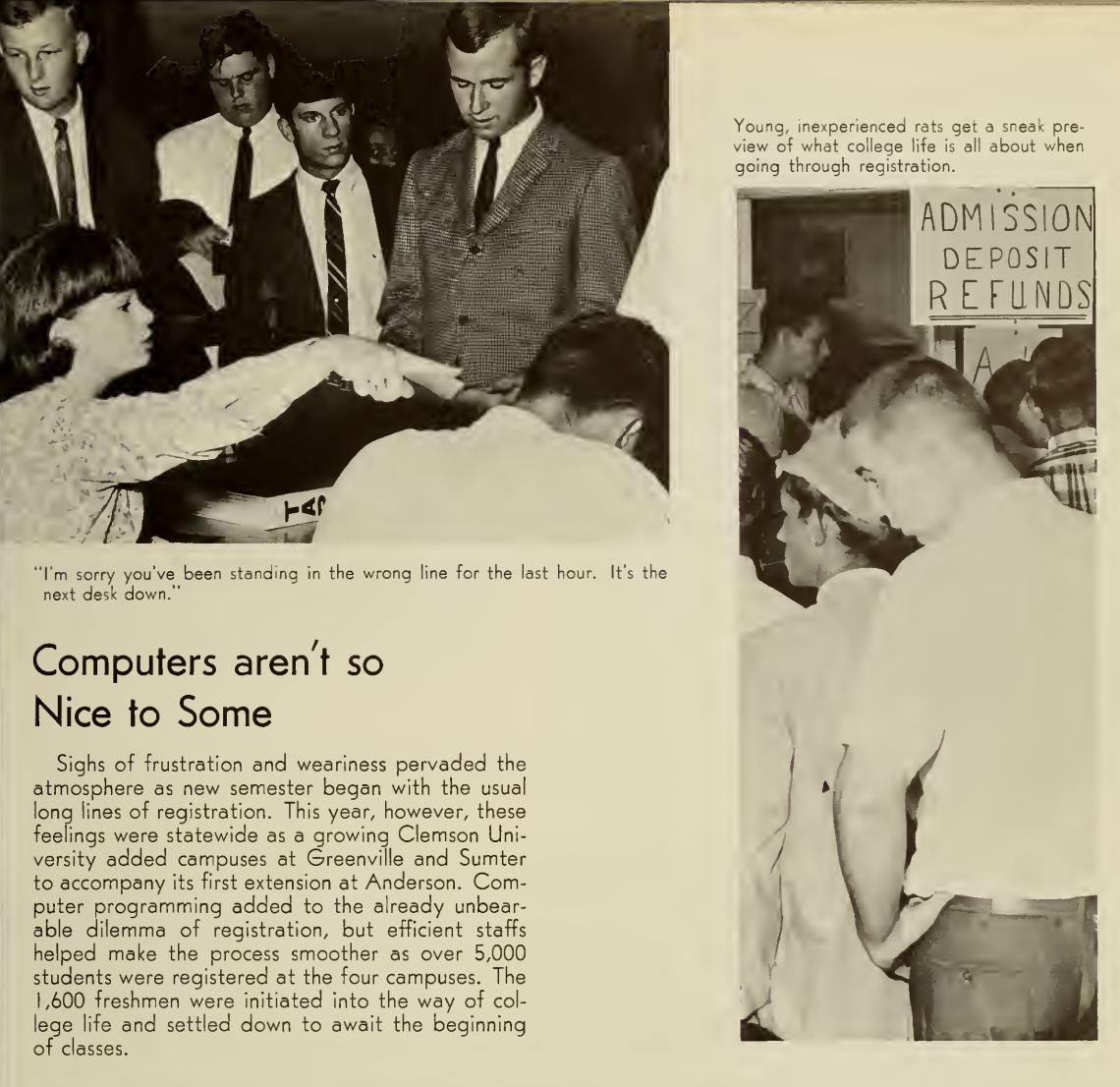
The first computer at Clemson University, the RPC-4000, was initially used for academic instruction in programming and statistical analyses and optimization studies by the School of Agriculture. In 1964, Eugenie Bartmess wrote the first course scheduling program, which was used to schedule 1,100 incoming freshmen and which ran about 14 hours in total. A second administrative application on the RPC-4000 was a grade point ratio (GPR) prediction system for applicants to help the Registrar's office make admission decisions.
Two IBM mainframes were acquired in 1966: an IBM S/360 Model 20 in the Business and Finance office, with the data processing group within the Accounting Division of that office being supervised by Ray Harrell, and an IBM S/360 Model 40 in the Computer Center, which is led by Merrill Palmer. Payroll, telephone billing, budget status reports, inventory, and other accounting applications were developed for the Model 20. A student registration system was developed for the Model 40 in 1966, and in 1968 an alumni information system and a computerized circulation system for Cooper Library were developed. See "DP at Clemson - Business & Finance," Computer Center Newsletter, vol. 2, no. 2, October 1978, p. 6; the Library and Computer Center sections of the President's Report to Board of Trustees, 1968-1969, pp. 19-20 of the pdf; and, the special sections on course registration and library circulation below.
The Division of Administrative Programming Services (DAPS) was formed in 1974, initially led by Darrell Hickman and then starting in 1977 for many years by George Alexander. The rationale is given in the Annual Report of the Clemson Board of Trustees, 1974-1975, p. 45:
The Division of Administrative Programming Services, created in July 1974, administers the information processing requirements of the University. The Division was formed in order to consolidate several diverse systems development activities into a single development group which is responsive to the policies and priorities of the University.Its charter is threefold: to create and maintain operational information systems as are necessary for the daily operation of the University; to develop a University-wide data base as a natural byproduct of these operational information systems; by using the data base as a foundation, to design and build a fully integrated management information system for use by the University administration as a planning and policy making tool.
DAPS developed a number of software systems in the 1970s and 1980s, including:
See "The Invisible Center," Computer Center Newsletter, vol. 3, no. 1, September 1979, pp. 13-14, for a short history and description of the Division of Administrative Programming Services (DAPS) after its first five years. Note that there are yearly DAPS summaries of work in the 1970s and 1980s Annual Trustee Reports. See also, "In the Spotlight: DAPS," Computer Center Newsletter, vol. 7, no. 1, Fall 1983, pp. 15-20. In 1985 DAPS was moved into the Division of Computing and Information Technology (DCIT).
Beginning in the 1990s, with the possible Y2K issues in view, Don Fraser remembers that several of the major in-house enterprise applications coded in COBOL to run on the mainframe were planned to be replaced with third-party software packages that would run on non-mainframe platforms. This includes moving to PeopleSoft in 1999.
The IPTAY system was apparently the first one to encounter Y2K problems according to Chris Haire, "Clemson Experts Ready '4Y2K'," The Messenger, February 6, 1999:
In 1992, [Phil] Lyles and his associates first began to address the problem when they learned that IPTAY was experiencing problems with their software.The problem surfaced when 10-year pledges were entered into IPTAY software. Since the software wasn't Y2K compliant, the computer system was unsure of how to handle dates past 2000.
Once the problem was discovered, the software was immediately rewritten, ridding the software of the computer bug.
In the March 1993 issue of DCIT Update Newsletter (vol. 16, no. 4), Dr. Duckenfield wrote in his "Vice Provost's Letter" on page 3:
Implementation of the DCIT Strategic Plan is continuing. An area of recent emphasis has been to begin work on the details of moving Clemson computing from MVS mainframe systems to alternative platforms.Over the past ten years there has been a natural progression of academic computing from the MVS mainframe to mid-range machines, workstations, and personal computers. ...
Administrative computing on the MVS mainframe has seen significant growth at the same time that academic computing has been declining. Left to itself use of the MVS mainframe for administrative applications will continue to expand rapidly as departments attempt to do more with fewer resources by relying more and more on the computer. A strategic decision has been made that this would not be in the long-term interests of the University and so major new systems will be developed on non-mainframe platforms wherever possible and interfaced to existing systems on the MVS mainframe. These existing systems will gradually be moved off the MVS mainframe also. The timetable for a complete transfer of administrative applications away from the MVS mainframe is expected to be 5-10 years.
There are turbulent times in the computer industry, but we are setting an information technology course for the future that will enable us to continue to provide a high level of service not only for the immediate future but into the next century.
See references below about moving applications to client/server architectures. Also see Y2K references below.
Here is a list of some of the high-profile internal systems during the 1990s and early 2000s:
CLE was one of two Clemson University systems that received awards in 1999. From C.J. Duckenfield, "Clemson Computing Gets Worldwide Attention," computing@clemson.edu Newsletter, vol. 5, no. 2, Winter 1999, p. 2:
Clemson University received rave reviews at the Networld computer trade show held in Atlanta on September 13-16. Two Clemson products, AuthServ and the Collaborative Learning Environment (CLE), were announced as winners in the Novell Developers' Contest.AuthServ, which allows access to network resources through a single userid and password and is the technical foundation of the virtual laptop system, won the award as the Best Commercial Application.
The Collaborative Learning Environment won the award as the Best Overall Custom Application and $25,000, which DCIT will reinvest in further CLE developments.
David Condrey was the principal designer and lead developer on the backend for CLE. See further references below.
In 2003-2004, DCIT undertook a pilot project for faculty to compare three course management systems: MyCLE, WebCT, and Blackboard. The latter two were commercial systems that were being used at other universities. Blackboard was eventually selected as the course management system for Clemson University, followed by Canvas in 2017. A description of the pilot program and a comparison of the three systems is given by Jamie Brown, Laurie Hillstock, and Dawn Robertson, MyCLE - Your Portal to MyCLE, WebCT, and Blackboard Course Management Systems," computing@clemson.edu Newsletter, vol. 9, no. 1, Fall 2003, p. 4-6.
DCIT is currently designing an application suite called the Image Management System (IMS) 2.0 to handle the automatic software updates of lab workstations from a central location across campus. IMS improves upon the previous lab update system by dramatically reducing both the time required to update the machines and the number of machines updated simultaneously. Since the needs of the Clemson lab environment vary widely, the Lab Support Group itself has designed and implemented this software based upon an experimental networking protocol currently not in widespread use. ... IMS will be available in the spring semester, 2003.
The History of the Division of Information Systems Development (DISD)
Dr. Arnie Schwartz, the Dean of the Graduate School and VP (not sure about the title) of Research, was responsible for the Computer Center at Clemson. I was hired as an Assistant Professor of Mathematical Sciences in 2/71, and since I started after the semester started, I had a part time appointment with the Computer Center. I designed and implemented a few systems for the administration, including a payroll system (working with Ray Harrell and VP for Business and Finance, Mel Wilson), Plant Pesticides Management System (working with Jack Jackson), and Central Stores inventory management system for the Purchasing Department (working with Jack Wilson). While working on these projects, I met Francis Crowder, an executive in the Appalachian District Health Department, who asked if we could design and develop an online Health Records System. I hired a Math Sciences graduate student, Kevin Davidson, and a Math Sciences undergraduate student, Harry Ragland, to work with me on the system. After about 4 months, we had an operational system using an IBM 3270 terminal connected to the Clemson mainframe and shortly after had 4 or 5 IBM 3270s connected in the Greenville Health Department where Francis worked. This was the start of networking at Clemson and soon followed with the installation of IBM's Time-Sharing Option (TSO) and the installation of a few asynchronous terminals (I believe they were Hazeltine 2000s and Texas Instruments 725s) in the Computer Center.Because of this success Dean Schwartz decided to establish a new division, the Division of Information Systems Development (DISD), and asked that I head the division working about halftime there and halftime in the Math Sciences Dept teaching computer science courses. In order to avoid any perceived conflicts-of-interest on behalf of the University or DISD's off-campus clients, DISD's mission was restricted to only work on projects funded by off-campus clients. During the next few years DISD expanded its work with the Health Department to include a project named the "Cooperative Interagency Referral System" (nicknamed CIRS but sometimes referred to internally as the "Circus"!). The Health Department rewarded Clemson by offering free physical exams to all Clemson faculty and staff through the system. Using the system, appointments were made, reminder letters were mailed and results made available through the system.
[from 2024: The Cooperative Interagency Referral System connected about 20 different SC State agency departments (using IBM 3270 terminals) to share medical and related records via a common database (IDMS - hosted on the Clemson computer) and allowed users to be able to communicate with each other (a very crude email system) by leaving messages in a database to be retrieved later. Another feature was the ability of one agency to be able to make appointments for another agency, using a shared calendar, and have conventional mail sent to the patient reminding them of the appointments.]
DISD also began working for the many other SC Departments with projects such as Food Stamps, Title IV-D (Absent Parent Program), Title XX (HHS block grant program to support a wide range of social services for individuals and families in need), Mental Health, State Development Board, Land Resource Conservation, Greenville Planning Commission, Wildlife and Marine Resources Department, the Department of Forestry, Comprehensive Manpower Training, SC Governor's Division of Administration, Lander University Business Administrative System, and even the first IPTAY system!
For several years during this period, I used to travel for a week during the fall semester to almost all the public and private colleges (except LSU) in Louisiana to recruit students for the Math Sciences graduate program at Clemson. At one time more than half of the Math Sciences graduate students came from Louisiana! Naturally, many of them were interested in computer science, since that was my primary pitch. As the workload for off-campus clients increased, DISD funded at times as many as 20 Math Science assistantships for students to help develop database and networking projects. I also hired several full-time experienced people to work on the projects. Many of the students earned MS degrees in Math Sciences and were later hired as full-time employees at Clemson and some went into industry or to other Universities to earn PhD degrees.
These projects all required work related to database and data communications (networking) so DISD developed two major infrastructure software systems that made it possible to quickly create production applications using remote terminals, independent of their brands, but connected to the Clemson mainframe computer using IBM's TCAM. The first system was called "Generalized Panel Management System" (Genpanel) which was an early precursor to modern screen management systems that used a master template and automatically populated variable fields and even performed validation of data entered by users on a variety of terminal types with different control fields (like protected, high intensity, blinking, etc.). The second was a system called "Generalized Telecommunications Management System" (GTMS) that made the interface to IBM's TCAM easy to use from a high-level language like COBOL.
Because of DISD's success with off-campus projects, Dean Schwartz decided to split off the administrative programming functions from the Computer Center and created a new division called the "Division of Administrative Programming Services", nicknamed DAPS. Darrell Hickman, a former EDS employee, was hired to head DAPS. After a few years, Darrell was promoted to be an Assistant Vice President of Business and Finance and George Alexander was promoted to be the Director of DAPS.
I can remember a story when President Edwards visited the Governor's Office in Columbia, and while waiting in the outer office, saw a secretary using a terminal on her desk. I suspect he had never seen an online terminal before so he asked her to explain what she was doing. She explained that she was connected to a computer on the Clemson campus and the data was stored on a database so she could manage information instantly from her desk. He was amazed and asked Dean Schwartz to start planning to use terminals for the Clemson administration!
I can recall an amusing story when Ray Thompson (the Personnel Director whom I knew well due to hiring employees at DISD) saw some of the online work DISD was doing for SC Government and asked why the Personnel Department wasn't using these systems and terminals. I answered that DISD had developed software to make implementation of online systems fast and easy. Ray then challenged me to create a system he could use to manage his CUBO 402 form (the personnel form all new employees completed prior to starting work). I asked if he had some spare time that evening and if he could come by my office at about 7:00 pm so I could show him how easy it was to create a new application. Ray showed up at 7:00 pm and we had a working system to manage his CUBO 402s by 11:00 pm. He was astonished and went to DAPS the next day to tell them what we did in 4 hours. Soon after, DAPS began using the DISD infrastructure software to create applications for the Clemson administration!
[from 2024: The support software resulted in 2 MS theses, "Genpanel" (Judy Walden) and "Generalized Telecommunications Management System" (Eric Songy who didn't finish his degree).]
Clemson's public health information system, one of the largest IDMS applications, provides access to medical records for patients receiving health services throughout the Piedmont region. County officials communicate with the data base through IBM 3270-compatible terminals.During the spring of 1975, the network grew to approximately 100 terminals and 40 printers in support of an interagency data base, maintaining data for over 140,000 people.
The base application is built around on-line update and retrieval with batch processing each night to accommodate an average of 1,000 transaction/hour, jumping to 3,000 during peak loads.
Development contracts with DISD for this year exceed $1,000,000, while production support contracts with the Computer Center exceed $1,300,000. This additional funding enables the University to acquire superior hardware and software facilities which are shared by both the academic and off-campus users.
DISD was created to act as a "problem solver" for State Government, or a necessary source of expertise as the state's computer usage expanded. This group provides no direct services to the University Administration and therefore, receives no university funding. Its existence is wholly dependent upon successful bidding on contracts for information systems design. Development contracts with DISD for this year exceed $700,000.To fulfill contract demands faculty members from several departments work with DISD as needed. Past contracts have included faculty in Psychology, Agricultural Economics, Statistics, Accounting, and Industrial Management. The participating Computer Science faculty depend upon contract work for a substantial portion of their salary, including full-time summer employment.
Another main function of DISD is to serve as a "training ground" for students. The group attempts to complement classroom Computer Science education with "real world" training. Since its beginning in 1974, DISD has funded 48 graduate students with assistantships and employed 18 undergraduate students. Presently there are 13 graduate assistants and one undergraduate student working on projects through DISD.
References and Additional Discussion for Clemson Edit
The use of the Source Management System in conjunction with the Editor provided major performance enhancements over the use of partitioned data sets with IBM's TSO EDIT. CPU time required to get into edit mode was noted to have been reduced by factors of from 50 to 100, and similar reductions were achieved in the number of I/O operations required. The efficiency of the combined system is the largest single factor in enabling Clemson to provide uncommonly large numbers of TSO users with good response time for editing type operations.
The overall concept of the Clemson Editor and SMS was due to Russell Schouest. I was responsible for the detailed design and implementation of the editor, and system programmer Phil Ross wrote the first version of the SMS in the period spring 75 to maybe 77.The first version of the SMS had hard code dependencies of IBM 3330 disk geometry and was generally uncommented and unreadable. Phil left for a job in Atlanta, and between 1978 and around 1979 I rewrote the SMS from the ground up to make it independent of disk C-H-S geometry and more maintainable. During that period undergraduate students Andrea Snow and Tom Williamson worked with me under my direction to add IBM SPF like "full screen edit" capability to CE when the user was on a 3270 compatible or other full screen capable terminal, such as the Hazeltine and IBM 3101 that used asynch link layer protocols.
I also wrote some utilities. One "Fastback" impressed the operators. It backed up a an entire SMS physical library (up to an entire disk pack to tape) by reading an entire cylinder into memory from the disk in a single EXCP (execute channel program) using data and command chaining and then writing it to tape the same way. It was also double threaded so that as one cylinder was being written to tape, the next one was being read from disks. The operators told me that the tape drive made a "howling" sound they'd never heard before and wondered if something was wrong with fastback ... There was nothing wrong. Those were the most fun days of my career!
References for the Medicaid Management Information System (MMIS)
1.1 Brief History of MMIS in South Carolina
The MMIS system was developed as a project between the South Carolina Department of Social Services (SCDSS) and Clemson University in the late nineteen seventies with some help with requirements through a request for proposal (RFP) with Touche Ross consultants and utilizing some concepts from Minnesota's MMIS. It was developed on Clemson's mainframe using COBOL and Assembler programming languages, Cullinane's IDMS database management system, and a proprietary online system. In 1981 it achieved federal certification - the first federally certified database oriented MMIS. In the late 1980s, the proprietary online system was replaced with CA-ADS/O.Over time, SCDHHS has undertaken projects to enhance the functionality of the MMIS and to meet certain external and mandatory requirements.
Today the MMIS, in addition to the mainframe, also includes a real-time Eligibility Verification System (MEVS) developed by Clemson in 2001 using the X12 270/271 transactions. In 2003, as part of the HIPAA remediation done under a contract with EDS, an Electronic Data Interchange (EDI) component for handling HIPAA X12 transactions to/from trading partners and a web application providing claims data entry/submission and eligibility inquiry were added. Claim status inquiry was added to the web application in 2005.
The MMIS also includes new interfaces to contractor-supplied systems that replaced paper-based or other manual processes.
MMIS has seven core subsystems: Recipient, Provider, Reference, Claims Processing, Payment, Management and Administrative Reporting (MARS), and Third Party Liability (TPL). The MMIS has evolved in response to state and federal programs and the overall health care environment.
Through the MMIS, SCDHHS can enroll providers, adjudicate claims, pay providers, report costs and utilization, and enroll recipients in special programs. Providers can verify Medicaid eligibility 24 x 7 and inquire on the status of their claims.
1.2 Brief History of MEDS in South Carolina
The Medicaid Eligibility Determination System (MEDS) system is also managed, operated, and maintained through a contract with Clemson University. The system houses Medicaid eligibility data. In 2002, Clemson replaced the twenty-eight-year-old batch eligibility system operated by the SCDSS with a real-time and batch MEDS system operating on the same mainframe as the MMIS. The database management system is relational IDMS.Using MEDS, eligibility workers throughout the state take applications from potential beneficiaries and determine their eligibility based on financial and resource data, as well as citizenship, identity, and several other criteria. MEDS interfaces with federal agencies (Social Security Administration-SSA, CMS, etc.) and state agencies (SC State Retirement System--SCSRS, Employment Security Commission-ESC, DSS, etc.) to verify data and assist in determining eligibility. Eligible beneficiary information in MEDS is passed to MMIS for use in claims processing and special Medicaid programs.
I was on the trip and know for certain that we rejected the approach taken in Minnesota. ... We started from scratch with our own design and had it working before the Minnesota system was even thought to be finished. ... BTW, we also visited Kentucky and Arkansas early on in the project to see if we could use one of their systems as a starting point for ours, but all had serious drawbacks.
References for the Expert Library Manager (ExLM)
The new Expert Library Manager software further automates the free slot, scratch, cartridge residency and ejection functions of the Library Storage Module management and flexibility and was developed for StorageTek by Clemson University Research Foundation. ... the expert software is $6,000 and $350 to $1,000 a month.
ISD is continuing to seek business opportunities outside of state government. While state agencies in South Carolina continue to provide the bulk of ISD revenue, non-state business has been slowly growing. Where possible, ISD is putting together partnerships with commercial companies and the Clemson University Research Foundation (CURF) to bid on government contracts. Having the commercial company as prime, subcontracting work to CURF which in turn subcontracts to ISD, enables ISD to obtain contracts with the minimum of overhead. ISD consists almost exclusively of full-time professional systems developers and has no marketing and a minimal support staff.ISD has developed a commercial grade software package for CURF that is marketed by Storage Technology Corporation of Louisville, Colorado. This package, used to manage the operation of tape-mounting robots, now is marketed and in use by major corporations world-wide. Revenue from the sale of this software is used by CURF to support other R&D computing projects in DCIT and to provide support for academic computing at the University.
Clemson leveraged its past research success into an investment in the future through a partnership involving the Division of Computing and Information Technology, the Clemson University Research Foundation and Sun Microsystems. The acquisition of two high-performance computers gives Clemson more computing power than any other state institution and puts it on par with the nation's top research universities, and it didn't require one dime of state funding. The Research Foundation acquired the systems from Sun at a significantly reduced price and then funded the whole thing with royalties from software developed by DCIT.
An additional 40 percent of Clemson's royalties are derived from a software program that automates tape data storage and retrieval systems. The software was developed by DCIT under contract to industry though the Clemson University Research Foundation. It is the brain behind a fully automatic cartridge based data storage and retrieval system.[I believe that the "three" computer systems mentioned in this article is likely a mistake; note that all the earlier references mention only two.]This system uses robotic arms to retrieve and mount bar-coded cartridges from a 10-foot siloshaped "library" which holds 5,000 to 6,000 cartridges. The revenue generated by this software was used to purchase three high-performance computer systems, which greatly enhance Clemson's stature as a major research university.
Further, using funds from the Clemson University Research Foundation generated by sales of DCIT-developed software, a new student computing lab has been installed in Martin Hall. This will be by far our largest lab, housing about 120 machines, ....
References for the Authentication Services (AuthServ)
Version 1 of AuthServ has been in use at Clemson University since July, 1996. There are over 35,000 user accounts at Clemson accessing over 100 NetWare, Windows NT, and Unix servers and an MVS mainframe. Clemson's AuthServ server processes an average of over 40,000 logins and over 200,000 authentication requests each day. After demonstrating the system at Novell's BrainShare98, there were numerous requests for a commercial version. AuthServ Version 2.0 was developed in response to those requests.
References for Test and Evaluation Community Network (TECNET)
References for Precision Agriculture Software
Spring crops are going in the ground and fertilizer prices are skyrocketing.To help ease the sting of costs on growers, the Clemson University Cooperative Extension Service Precision Agriculture group has developed two new soil fertility calculators, or apps, to help growers maximize their fertilizer dollars.
The NPK Recommendations Calculator and the Fertilizer Blend Calculator can be used on any device with Internet access. Both calculators are designed to support the needs of large acreage farmers, home lawn and garden applications, and small plot vegetable producers.
The NPK (Nitrogen, Phosphorus, Potassium) Recommendations Calculator uses soil type, crop code and soil test levels for phosphorus and potassium to provide Clemson recommendations for fertilizer applications. These recommendations can be pushed to the Fertilizer Blend Calculator to calculate application rate after accounting for other inputs and ultimately determining suitable fertilizer blends.
"Rate- and cost-optimized fertilizer blends to satisfy the nitrogen, phosphorus and potassium rates for a particular application are calculated based on user-specified, locally available fertilizer products," said Kendall Kirk, Clemson Extension precision agriculture engineer. "This will save growers money and increase yields by reducing fertilizer overapplication and mitigating fertilizer underapplication. Using these soil fertility calculators will help growers maximize their fertilizer dollars."
Kirk is part of a robust team of scientists dedicated to developing precision agriculture technologies such as software, sensors, UAVs and robots designed to increase farming productivity and promote sustainable agriculture. The team is housed at the Edisto Research and Education Center in Blackville, South Carolina, which also will be the home of Clemson's new Center for Agricultural Technology (CU-CAT).
As the 2025 growing season kicks off, the Clemson Extension Precision Agriculture Program offers free web apps to help farmers boost productivity and make informed decisions."Many of these tools were developed in collaboration with Extension team members and Clemson professors after South Carolina growers expressed concerns related to applying the proper amounts of inputs needed for their crops to grow," said Kendall Kirk, director of the Clemson University Center for Agricultural Technology (CU-CAT). "We realized we could make people's lives easier by automating some of these calculations."
The U.S. Army used Balanced Flow™ to plan for, introduce, and replenish new combat uniforms for all soldiers deploying to Iraq and Afghanistan. Balanced Flow™ helped equip troops with new uniforms in less than one-fourth of the time the Army normally required to introduce a new product. Balanced Flow™ helped synchronize both ordering and manufacturing. It avoided millions in inventory investment that would have occurred with standard supply chain systems and practices.The Marine Base at Parris Island employed Balanced Flow™ to improve distribution of clothing to recruits. Before, recruits lacking certain clothing items were unable to participate in training. In less than two years, Balanced Flow™ helped reduce recruit clothing inventories from $12 million to $1.2 million while reducing stock outages from 15% to almost zero. Eliminating stock outages resolved critical problems in the training program, the main mission of the base. Also, using Balanced Flow™ eliminated the need for a local wholesale inventory and allowed the base to close one of their warehouses.
RPC-4000 Programs
Accounting Information System (AIS)
Prior to the CUBS PeopleSoft system, Clemson University used the in-house Accounting Information System (AIS). A data warehouse, downloaded from AIS, provided flexible financial reporting across campus. With the purchase of PeopleSoft, the old AIS data warehouse was no longer in use.
Dean Schwartz reports that work on development of the Student Data Base is proceeding but is currently about three weeks behind schedule. When complete, the data base will be used for a variety of record-keeping chores, will facilitate the entire record-keeping process and will be accessible for faculty counseling of students on their academic programs.
Employee Information System (EIS)
With the last database, "Curriculum," created in April 1988, the first twenty four degree progress reports, as they were called, rolled out for one department, Electrical Engineering, selected because of its relative rigidity of courses in sequence. Wayne Bennett, the eager department head, was ecstatic. By October 1988, two colleges were "online," and six months later the number rose to five colleges and half the undergraduates. The full system was in place in 1991, and for the autumn of 1992, 12,837 reports were delivered to the nine colleges. It took a few more years (1995) for the famous "what-if" question to be posed online by an undergraduate. The students heralded the degree progress system as "Oz-The Great and the Terrible!"And the faculty and advisors? Most expressed enthusiasm. Janie Dillon in the College of Sciences said, "Every time I look at one of these sheets, I am amazed at the amount of information on it." Gordon Howard, from Parks, Recreation and Tourism Management, commented, "Nothing else comes close to it in providing service (faculty, student, and staff clients).... The Clemson Degree Progress System is one of the best in the nation." And faculty from many other schools took notice, such as the assistant registrar at the University of Texas, Austin, who wrote (April 6, 1994) to express appreciation. It signified a true step forward for Clemson.
Moving to Client Server Architectures
Collaborative Learning Environment
Highlights:
1940s
In addition to late registrants, there is also a group of students who find it necessary to make adjustments in their programs during the regular two-weeks period provided for adjustments. After the adjustment has been properly approved during this period, the Registrar's Office notifies faculty members by a blue-striped IBM card authorizing the instructor to add the student's name to the section roll or by a yellow-striped IBM card authorizing the instructor to drop the student's name from the roll.Cards are also used to report grades; see page 12 of the manual.
1950s
1960s
Up until the 1964-1965 school year scheduling was still being done using tab equipment housed in the Accounting and Registrar's offices in Tillman Hall, but student enrollment was again on the upsurge and the scheduling process had become too much to handle manually in a reasonable period of time. Mrs. Eugenie Bartmess had come to Clemson around 1962 to teach 1/2 time in the Math Department and work the other 1/2 time for the Registrar's Office. It was Mrs. Bartmess who wrote Clemson's first computer scheduling program.[Note that the Clemson Newsletter, vol. 5, no. 11, February 1, 1966, p. 7 (appears as p. 142 of the pdf), states:In 1964 Clemson used the RPC 4000 to schedule the entering freshmen. It was not an easy process. Everything had to be coded numerically. It could only schedule 80 students per hour and there were 1100 incoming freshmen. The machine was struck by lightning resulting in the loss of the blocking code for the jocks, and someone dropped the paper tape and it had to be strung around the basement in an attempt to untangle it. But, despite all the problems, all the incoming freshmen were scheduled and classes started on time.
Eugenia [sic] Bartmess (Math) has joined the office of Registration and Admissions (as of January 1) and will devote about two-thirds of her time to duties as assistant to the Registrar. She will also continue as an Instructor in Mathematics.So, the halftime role for Mrs. Bartmess in the Registrar's Office from 1962 stated in Computer Center Newsletter appears mistaken.]
Class registration for the second semester 1966-1967 will be accomplished in the usual manner; however, to test procedures and results of a completely computerized registration, a parallel operation will be carried on by the Computer Center. Plans are to conduct these parallel registrations for at least next semester and first semester 1967-1968 before abandoning the present system.[Much of this same information is printed in "Schedule Plans Revealed For Upcoming Semester," The Tiger, vol. 60, no. 13, November 18, 1966, p. 1.]To accomplish the computer parallel registration, all students (including graduate, postgraduate, non-degree, and part-time students) will be required to submit a program of adviser approved courses on a predesigned IBM card. It is anticipated that the IBM program cards will be available immediately after Thanksgiving holidays, and that class advisers will approve student programs during the period November 28-December 7;
...
Courses are to be ranked on the program card in descending order of student preference for section showing alternates for doubtful courses and electives.
...
In August 1966, with the cooperation of students and faculty, approximately 2900 students were scheduled using the McBee equipment. With the installation of the new IBM computer, it will eventually be possible to schedule and register all students.
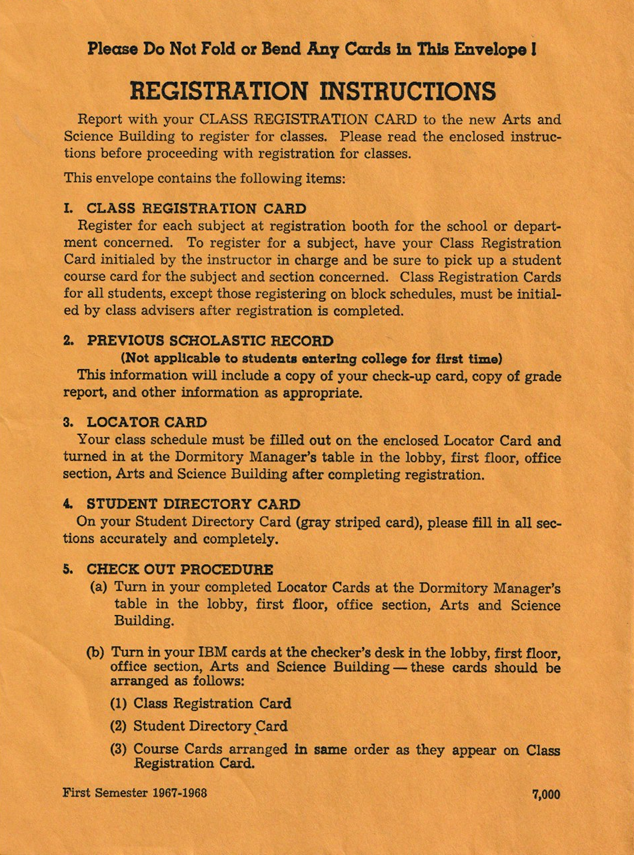
Courtesy Laurie Sherrod
1970s
... the computer processes 6800 students through 1024 courses and 2048 sections, and comes up with workable schedules 85% of the time.
...
"Our philosophy is that students will not mind losing one or two out of five requested courses in order to keep a large percentage of students from losing all five," said Mrs. Eugenie V. Bartmess, Clemson's Schedule Coordinator and the lady who computerized Robin Hood.To do this, the computer is programmed to give equal emphasis to three factors in registration.
The first involves an even distribution of students over the total number of course sections. This means that if a student's requested section is 20% fuller than the least requested section, the student will be programmed into a section having a lower enrollment.
"We start cutting people out of their requested sections before the sections are closed out," said Mrs. Bartmess, adding that although the basic effect of this procedure was "in the faculty's favor," it made it possible to have "about six seats in each section open on registration day."
Secondly, the computer works on a "balance factor," designed to provide an even distribution of classes across the week. A good schedule is considered to have a factor of 1.0 or less. The factor's effect is to keep a student from having an extremely heavy load on two days and "almost nothing the rest of the week," said Mrs. Bartmess.
Finally, the computer considers lunch. This means that any schedule which blocks out a half-hour break between 11 a.m. and 1:30 p.m. will automatically be dropped.
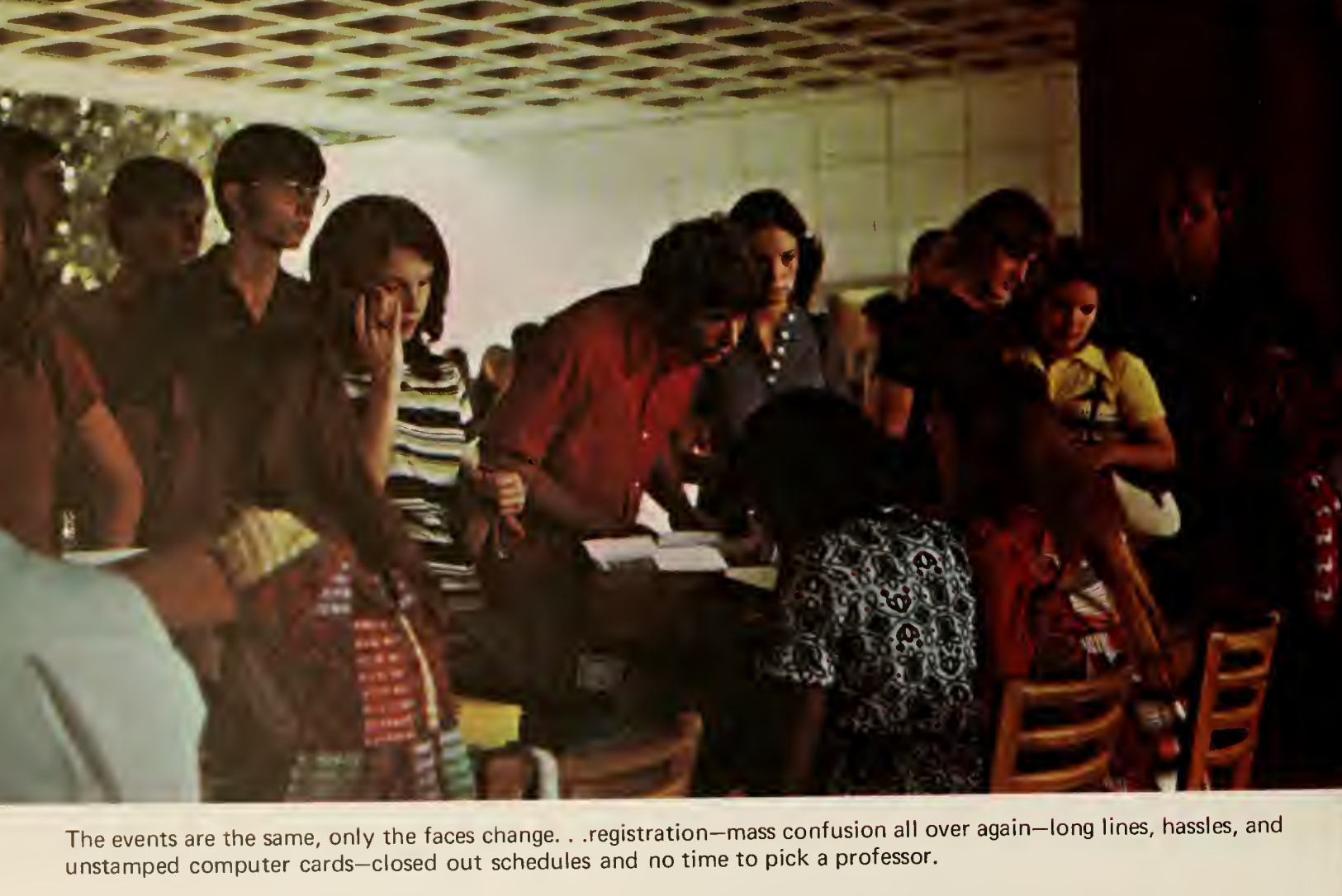
When I arrived at Clemson in 2/1971 the registration system [which was written in assembly language] ... consumed all the computer resources and ran for several days before completing. The results were that about 70% of the students were scheduled and the other 30% had to run around trying to manually sign up for classes that still had room.When Russell Schouest was hired as Manager of System Programming ... [he offered Pat Sterling] a job in systems programming and asked that [Pat] help to write the new registration system. Pat agreed and moved to Clemson. The new system was written in COBOL, produced about 97% complete schedules, and ran in about 15 minutes!
Some of the major features that Russell Schouest put in the system were
- the ability to make trial runs with an initial courses/sections/times defined by department heads,
- show the results of how many students were registered for which sections of courses and then
- make recommendations about which sections should be closed and
- suggest whether and where new sections should be opened.
Since the system ran so quickly, many runs could be made with changes in sections and times to see how many students could and couldn't be scheduled. When the number of "schedulables" reached an acceptable level, a final run was made to lock in schedules and send them to students.
1980s
"The way we're working right now, I think we have one of the best scheduling systems in the country," explains David B. Fleming, scheduling coordinator for the office of admissions and registration."Normally we honor over 97 percent of the students' requests for classes. Out of 54,000 class requests, we honor all of them but about 1,400 or 1,500, and no other institution in the country gets that high a rate. The next highest gets about 94 percent."
To understand the intricate process by which a student's choices out of a course scheduling booklet get to the final class rolls, it is helpful to look at a typical semester of effort by the scheduling office.
For the fall semester of 1981, the scheduling office geared up on January 16 when materials are dispatched to the many academic departments on campus so they can plan their class schedules.
Four weeks later this material is returned and initial TSO computer proofs are run and sent back to the departments for review. It is this data that is then sent to the printer for production of the class scheduling booklet. But this doesn't freeze the class offerings. An average of 500 classroom or section changes will occur before the classes actually begin in the fall.
Pre-registration by the students takes place during the second week of April, and for the first time at Clemson, summer school pre-registration will also be done at that time instead of at the start of the summer sessions. This gives the university some idea of what students will be requesting for their summer courses.
The latter part of April is spend [sic] processing the optical scan sheets and scholastic program cards turned in by students. Thus, by the first of May, the scheduling office is able to tell the academic departments where sections will have to be added or deleted.
Freshmen attending the seven summer orientation sessions fill out their schedules at that time and their requests are run in two batches, the first run after the third or fourth session. As massive a task as it may be, all 10,000 schedules are manually checked twice in an effort to catch miscoded ones. "We have ten to fifteen students who help us with this each summer, and they dread it!" added Fleming. Of the 54,000 requests, about 2000 have errors, but only 150 to 200 are flagrantly wrong, missing major data such as i.d. numbers or having two classes on the same card.
In addition to the 2000 or so freshmen schedules that are processed during the summer, some 600 transfer students have class schedules worked out by the office. These and the 7600 to 8000 continuing students schedules are worked with all summer as the computer tries to produce the best one for each student. The schedules are frozen about August 16 and the final runs prior to registration day are made.
During actual registration, the office processes all of the material turned in each day that night. The university requests this as there is a great deal of new student address and emergency data that needs to be as current as possible.
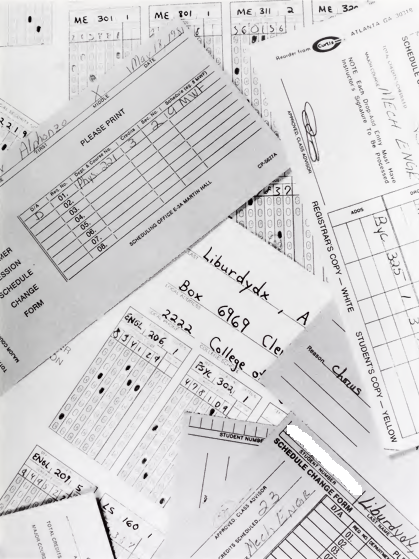
Photo of preregistration forms
from 1981 TAPS yearbook
Course pre-registration for the Spring semester of 1989 occurred just like always this year, except for one major change. It was done online! For the last seven years, students had submitted their course requests on optical scan (OMR) forms. ... The number of forms rejected by the OMR reader was so high that the Scheduling Office had student workers recode all forms before the forms were processed. Additionally, many errors were made by students in completing the forms, either transposing digits or copying the wrong scheduling code from the schedule booklet. These problems pointed to a new system.
...
The success of online pre-registration allows us to begin considering the next logical step, online registration. This decentralized approach would have data, not the students, traveling across campus (via the computer network). A student would then be able to sit at a terminal and accomplish most, if not all, of the tasks associated with registration. In addition to making simple address corrections, the online system would allow the student to make schedule changes, and finally calculate and print a bill.
1990s
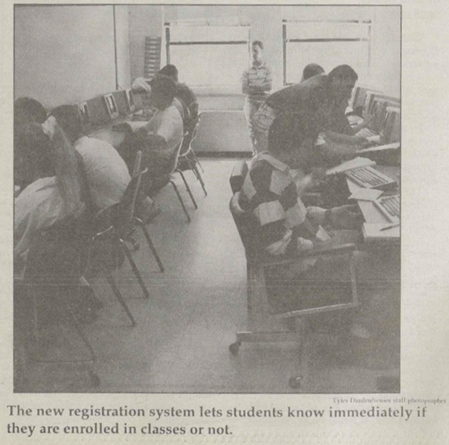
A Clemson tradition ends, but no one is mourning. Modern technology is replacing the long lines and closed-out classes of past registrations."The biggest advantage by far is to the students," said Clemson Registrar Stan Smith of the new on-line registration system which begins in April.
The on-line system is a continuous registration replacing preregistration. Students will be able to register at mainframe computer terminals or via personal computer dial-up access.
Students will immediately know they have a reserved seat in selected classes, allowing them to formulate their schedules.
Smith said two features in particular will be helpful in schedule planning. The first will list all sections of a class, and the second will list all open sections of a class.
Students will have access to the system until May 8 for the first summer session, June 19 for the second summer session and July 31 for the fall semester. During online registration, students may change their schedules by dropping or adding classes.
...
[discussion of access windows and use of advising numbers]
...
The on-line system is the result of proposals by a university-wide committee studying the registration system since October 1990. The Council of Deans endorsed the proposals on Oct. 28, 1991. The on-line system beginning in April represents the first phase. Eventually, touch-tone telephones may be used as data-entry devices. This feature was postponed due, in part, to the university's current economic situation.
[student name and ID at top of screen redacted]
Please enter a valid Action and/or Course Information below:
Action Abbrv. L/H Number Sec. Credits===============Message====================
  a    cp sc        210   002

+-----------------------Valid Registration Actions--------------------------+
| A = Add Class   L = List All Sections   N = Next Page   S = Show Schedule |
| D = Drop Class  O = List Open Sections  P = Prev. Page  X = Exit          |
+---------------------------------------------------------------------------+
Fall  Semester,  1991    -----Current  Schedule-----       Total Credits:  12
CP SC   462 001  3  DATABASE SYSTEMS     1:25-2:15MWF         DANL   303
                    PELLERIN JR  HENRY A
MTHSC   108 001  4  CALC OF ONE VAR II   8:00-8:50MWF         MARTN M105
                    BARTEK  FRANK K      8:00-8:50TH          MARTN M102
CP SC   105 002  1  COMPUTER APPL FOR ED 2:30-4:20M           DANL   105
                    ZAPF  CHRISTIAN N
CP SC L 101 001     COMP SCIENCE I LAB   2:30-4:20M           JORDN G 26
                    GREEN  JEFFREY B
MTHSC   106 001  4  CALC OF ONE VAR I    8:00-8:50MWF         MARTN M102
                    BELL  STEPHEN H      8:00-8:50T           MARTN M102
The initial implementation did not check for time conflicts or for
course prerequisites.
An on-line drop/add system involves keeping registration open a couple weeks into the semester. According to Jerry Jordan, a Data Processing Manager at Clemson, about 7,000 students went through the process, totaling 25,477 drop/add transactions this year alone.
...
One of the reasons this change will not come about in time for next semester is the difference of fees for full-time and part-time students. If a student were to change their status, then the fees would also need to be changed. According to Carter, "there needs to be a link with the Business Office and the bill recomputed."As soon as this link can be made, the implementation of the new system can begin. "The plans are laid," said Smith. "It's a matter of getting from here to there."
2. Paper Drop/Add Forms Discontinued
All course enrollments and schedule changes must be done using on-line registration system.
3. Centralized Registration Center Discontinued
Use on-line system to drop and add classes when new term begins. See advisor at his/her office.
4. Telephone Registration Will Be Introduced
New schedule book has step-by-step telephone registration worksheet. Terminal and PC with modem continue as primary means to register.
No more long lines to register by computer, or busy mainframe assess signals, students can now do all their registering via telephone without leaving their house.Students can not only register, but can add and drop classes with the touch of a few buttons.
"We tried the new registration system with 300 co-op students and the system worked well," said Stan Smith, the head of registration at Clemson.
"Letting such a small group of students have access to the system before allowing the whole school to use it gave us a chance to work out all of the kinks in the system for everyone else."
Though there are only 19 phone lines available now, the system will still allow plenty of students access the system readily.
"We hope that the system will help all students, but mainly we hope it will aid in the ability for off-campus students to be able to register more easily," said Smith.
...
There is no time limit for phone registration, but plans are being made to implement a time limit system if a problem arised. [sic]
...
Although the phone registration is new and convenient, the student lacks the ability to view their schedule at a glance. Students can use the system for dropping or adding a class simply by punching in a code.
In the early 1990's, the University of North Carolina decided to implement a touch-tone registration system. The plan was for each student to call in and punch in a code on his/her phone (landline, no cell phones back then) for each course he or she wanted to take the following semester. However, there weren't nearly enough phone lines to handle the load, so most of the students kept getting busy signals. To get around the problem, students starting having "registration parties" where a bunch of students would meet in someone's dorm room. As soon as one person got through, he/she would stay on the line until everyone in the room got registered.Around this same time, the head of the Clemson Scheduling Office, Bonnie Page, was advocating for some type of online registration at Clemson. Given the UNC experience, it was decided that rather than use telephones, students would logon to computer terminals to register. However, some departments (especially engineering) didn't want students to register for classes without approval from their advisors. So, someone came up with the idea to assign each student a five-digit "advising number" that he/she would have to enter at signon. These advising numbers were sent to each department depending on the student's major. Each department had the option of requiring students to see their advisors to get the number. Departments that didn't require their students to go through advising before registering could just provide the students with their numbers directly.
2000s
Once your access window opens, you have three options for registering:
- TigerWeb - tigerweb.clemson.edu
- TigerLine - 656-TIGR
- SIS
Only SIS and touch-tone phone access are mentioned in "Registration for 2000 Spring Semester Begins November 1, 1999," The Tiger, The Best of Clemson edition, October 28, 1999, p. 6. The first attempted capture of tigerweb.clemson.edu on the Internet Archive (which failed) is June 20, 2000.
Student registration for classes at Clemson first became available on the Web in fall 1999. Over the years, incremental improvements have been made to this system. And just before the beginning of this year, a whole new version of Web Registration was implemented.
...
Just as before, this Web system is a front end to the registration system on the university's mainframe computer. All the "business logic" as to who is eligible to register, or if the user may add a course section or withdraw from a course is all implemented on the mainframe. The Web puts a friendly interface on the system. What's new is that we have integrated information from additional data sources to a richer (and we hope less frustrating) experience.
2010s
Clemson is in the process of implementing a new Student Information System (SIS). The Banner Project, called iROAR, was approved by Clemson's Board of Trustees and will replace all areas on the Clemson website that involve the student, including Blackboard."The current student system has been developed and maintained over the past 30 years," said Nancy Griffis, director of academic services at Clemson. "It required modifications in order to best support the students and faculty."
"The University made a strategic choice to purchase the Banner Software package as a statement of direction in support of the 2020 Vision," she said. "Rather than develop the software in-house, we will implement the Banner Software solution as a way to stay atop industry best practices."
2020s
Similar changes over the years are described for the University of South Carolina by Chris Horn, "Punch Cards and Passing Out: Class Registration Blues," Remembering the Days, episode 68, September 7, 2023.
With regard to punched cards, Steven Lubar, then serving as the Curator of Engineering and Industry at the National Museum of American History, Smithsonian Institution, mentions that the University of Iowa used punched cards for student registration in the 1930s. See "'Do Not Fold, Spindle or Mutilate': A Cultural History of the Punch Card," Journal of American Culture, vol. 15, no. 4, Winter 1992, pp. 43-55.
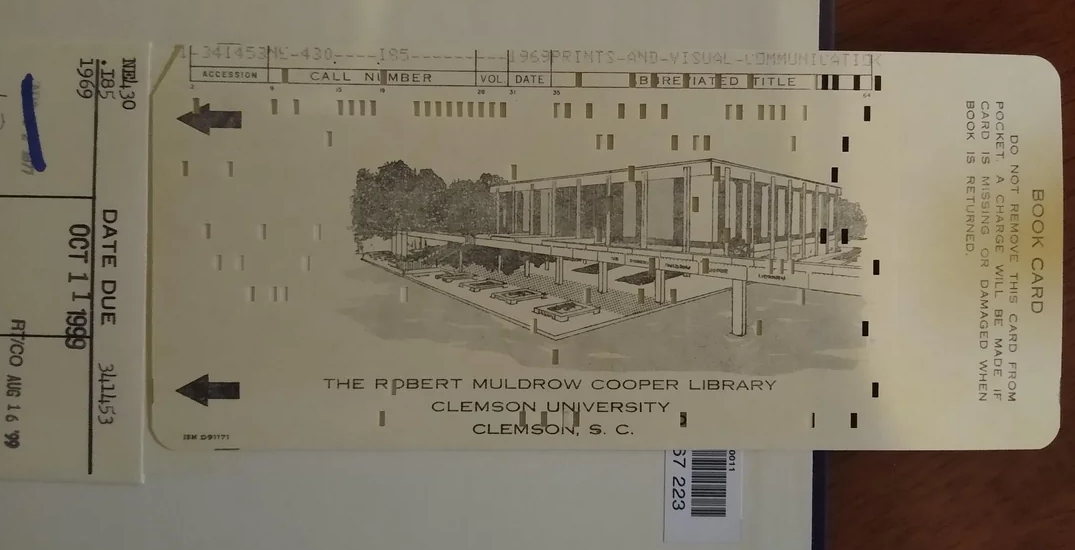
Clemson University implemented a computerized circulation system for the Robert Muldrow Cooper Library in 1968. A Reddit post, "Library IT circa 1969. Got this book on ILL from an academic library, and it came with a 1960s computer punch card that apparently encodes the bibliographic info. First time seeing this." shows a punch card from the 1968 system:
A study team prepared a library automation plan in in 1979-1980 with the help of IBM. See R.W. Meyer, et al., "Total Integrated Library Information System. A Report on the General Design Phase," Clemson University, Robert Muldrow Cooper Library, March 31, 1980, 76pp.
The team recommended acquiring the Northwestern Online Total Integrated System (NOTIS) and Library User Information System (LUIS) programs from Northwestern University. These were installed in 1983-1984. According to this libraries.org technology profile for Cooper Library, the automation system changed from NOTIS to Millennium in 2004 and then to Alma in 2018.
A description of the library systems from 1968 to 1988:
Each day, the computer scans its records on the thousands of books in circulation, spots those which are overdue, and produces neat, printed notices ready for mailing within hours after books become overdue.Computerized record-keeping at Clemson's R. M. Cooper Library replaces a manual, two-card method of lending books which had been used for 50 years.
Robert L. Wiggins of the University Computer Center planned and developed the automated system for Clemson's library.
"To my knowledge, Clemson is the only library in South Carolina with such a system already in operation," says Wiggins, a systems analyst. "We made a pretty big jump."
...
Besides looking after overdue books, the same computer has simplified the process of borrowing books. It now takes about five seconds to check-out a book as compared with two minutes or longer under the former manual operation.Computerized record-keeping has eliminated time-consuming and monotonous chores for both borrower and librarian. Since the borrower is not required to fill out any cards or even sign for books, there are no records to be filed.
"Students are getting faster, more efficient service," says Wiggins. "This is the main thing we are after."
A laminated identification card issued to Clemson students and employees serves as a library card. It is inserted into a data collection unit at the library's front desk along with the book's computer data card.
The transaction is immediately recorded on another data card which will be fed into the computer after the library closes to obtain a printed record of the day's business.
This daily circulation report lists every book currently in circulation, shows when it was borrowed, when it was due, and who has the book. The report also tells the number of overdue notices which have been mailed, if any, and the number of days which the book is overdue.
The most interesting innovation in the Robert Muldrow Cooper Library in 1968-69 was the installation of a computerized circulation system. In this system the record of each book circulated is transmitted to the Computer Center through data collection units at the circulation desk. At the Computer Center the transaction is recorded on a punched card. Each morning the Library receives a print-out of all books in circulation and other records necessary in the circulation system.
In February the Circulation Department changed from an automated circulation system utilizing the IBM 1030 system to the new, technologically advanced IBM 5230 Data Collection system. As with the 1030 system, Clemson may well be the first library in the nation to use this new system.
See also the Wikipedia article on the IBM 1030.
A highly significant reference service was initiated through the Lockheed Dialog Information Retrieval Service. This service provides quick access to bibliographic information in some 70 indexing and abstracting sources in a data base in California. In a matter of hours users of this service receive a bibliography on a subject of particular interest which, by traditional methods of searching, would take days or even weeks. The retrieval service is utilized extensively, particularly by researchers in scientific fields.
The application of computer technology to libraries has affected nearly every aspect of librarianship. In 1968 Clemson installed an automated circulation system. This innovation was followed by direct-line access to a data base in Ohio where the catalog records of the Library of Congress as well as many other libraries in the United States and Canada were available to Clemson as well as the catalog cards of these libraries.Then came direct on-line access to bibliographic information, a system in which about 100 indexes and abstracts are stored in a huge data base in California-the Lockheed Dialog Information Retrieval System. The time of faculty and research personnel in searching bibliographies was reduced from days of manual searching to minutes through use of the computer. Most recently interlibrary loan requests have been speeded up through use of computer applications.
Also this year, a joint Clemson/IBM team consisting of several library staffers, members of the Division of Administrative Programming Services and members of IBM's technical staff conducted a library automation study. Three months of planning using IBM's Education Industry Application Transfer Team resulted in a comprehensive report and recommendations for the development of a Total Integrated Library Information System.The report calls for enhancing the present circulation system by providing on-line access, establishing a comprehensive serials control system, and expanding the serials system to provide complete acquisitions and bibliographic control for the library. Efforts are currently under way to implement these recommendations.
More sophisticated and timely information needs of users combined with serious inflation in personnel costs have required the library to automate services and functions. With a general automation design study, which pin-pointed needs developed in 1979-80, library staff evaluated existing library automation systems in fall 1980 and at the end of the year recommended the University administration replicate the NOTIS system of Northwestern University. This system will provide Clemson with campus-wide computer terminal access to all library holdings including current journal issues. It will also allow the library to handle acquisitions, bibliographic control and circulation of materials with one consolidated, automated system.
The NOTIS (Northwestern Online Total Integrated System) software was acquired, installed and is being tested. Personnel from the libraries and DAPS are to be commended for the work they have done to install this major computer software system.
See also the 1983 Northwestern University press release on NOTIS, which mentions Clemson University.
A great deal of background work took place during 1983-84 for the installation of NOTIS, the libraries' total integrated library system. The computer programs received from Northwestern University were thoroughly tested and debugged. The libraries' database of bibliographic holdings, cataloged since 1975, was acquired from the Southeastern Library Network, Inc. (SOLINET). These tapes also underwent careful scrutiny. In April the cataloging module of NOTIS became operational so that now the Clemson database is updated with new records as they are cataloged. With the receipt of public use terminals early in 1984-85, patrons will have access to this database, or approximately 60 percent of the items in the card catalog.
The highlight of 1984-85 for the Clemson University Libraries was the public unveiling of LUIS. For the first time, users of the libraries had access to the on-line catalog from terminals located within and without the Libraries. By the end of 1984-85, more than 1,000 terminals on and off campus had the capability to access LUIS.
During 1985-86 implementation of the acquisitions and serials control modules in NOTIS was completed. This had significant impact not only for the staff using them, but also for the users of LUIS. During 1985-86 implementation of the acquisitions and serials control modules in NOTIS was completed. This had significant impact not only for the staff using them, but also for the users of LUIS. With these two modules in place, the user now can see which books and journals are on order, or which issues of journals have arrived and been checked in.A major project was the planning and implementation of the new NOTIS circulation module. Planning was managed by five task forces who worked throughout the year to implement this system.
In the spring, the entire staff barcoded the collections in Cooper, Gunnin and Sirrine libraries. The collection of the Gunnin Architectural Library was the first to be barcoded and was used to train the staff. The library officially implemented the circulation systems July 28, 1986.
Late in the year the Computer Center acquired the BRS Search™ software, which will be the basis for a new information retrieval system to be made available to the campus. This new service is named DORIS, Document Retrieval Information Service. With the BRS Search™ software, we will be able to load a variety of databases and provide access to all terminals on the Clemson network. The Libraries have already negotiated an agreement to load a portion of the AGRICOLA database. This is the premier agricultural database, and it will be available not only to campus users but to Experiment Station and Extension offices as well as via the CUFAN network.Other databases being considered by the Libraries include the ERIC database in education, a textile database and several technical databases owned by the National Technical Information Service. DORIS will also be used to search local full text databases such as the Business Manual, Faculty Manual and state contract purchasing lists.
For the first time, library users had access to bibliographic information on materials not necessarily housed in the University Libraries. The source of this data was the AGRICOLA database made available on the new system named DORIS (Document Online Retrieval Information System). AGRICOLA is the agriculture database produced and maintained by the National Agricultural Library. This database was provided by the College of Agricultural Sciences with funds from a grant from the Phillip Morris Company. Several local databases were created or adapted for use with DORIS. The minutes of the Faculty Senate are available on DORIS as well as a directory of faculty and students.DORIS is based on software leased from BRS, Inc., with funds provided by the Division of Computing and Information Technology. In addition, DAPS provides the programming support needed to load the databases and to make the system more user friendly. Clemson University is one of three universities in the Southeast using this software to provide faculty, staff and students access to bibliographic indexes and abstracts from terminals remote from the Libraries. The current state-of-the-art for library automation for index and abstract information is based on CD-ROM technology, which, to date, means the user must sit at a particular workstation in the library to gain access to index and abstract information. Clemson University is attempting to leapfrog that technology, where possible, to allow access to the same data from terminals located throughout the campus and state.
For more information of the installation and use of NOTIS, LUIS, and DORIS, see George D. Alexander, and Richard W. Meyer, "Clemson University," Chapter 5 in Caroline Arms (ed.), Campus Strategies for Librarians and Electronic Information, Digital Press, 1990, pp. 95-116. See also Richard W. Meyer, "Management, Cost, and Behavioral Issues with Locally Mounted Databases," Information Technology and Libraries, vol. 9 no. 3, September 1990, pp. 226-241.
From Meredith Futral, et al., 50th anniversary of R.M. Cooper Library booklet, 2016:
In 1990, the library introduced EDDIE (email, document delivery, and information exchange). Faculty and staff could check out materials, request photocopies, use Interlibrary Loan, make purchase requests, ask reference questions, and send suggestions entirely online.
...
In 1996, Cooper connected to the World Wide Web and rolled out CU Explorer. CU Explorer, a collection of internet-based workstations and resources, was introduced during Cooper Library's 30th anniversary celebration. At the 1996 fall convocation, Joseph F. Boykin, Jr., Dean of the Libraries, noted how such advancements impacted the role of the building, stating that, "library structures such as Cooper Library will become less important as warehouses and more important as meeting houses." He told the audience how, in Cooper's future, electronic delivery methods would become more important and how much more digital content would be available.
Of recent note, in 2025 Cooper Library added access to an AI tool to assist with research.
Newsletters published by the Clemson University Computer Center from 1968 to 1985, and then later by the Division of Computing and Information Technology (DCIT) from 1985 to 2006, give good snapshots of the software being used and developed by the university at different points in time.
These newsletters were published under various titles over the years. Some issues are available online as noted below. For physical copies, see call number LD1049 .C7 and the holdings of Series 419, Computer Center / DCIT, in the Clemson University Libraries Special Collections and Archives.
Long-time DCIT fans will recall that we gradually eased out of producing a printed newsletter in favor of an on-line version. The aim was to provide the same information at lower cost. We have learned, however, that a large proportion of our clientele does not read the on-line version and is less well-informed about Clemson's information technology activities than its more paper-bound predecessors. To resolve this problem we are reinstating a paper version of the newsletter which will include references to a more technically comprehensive online version.
Other Computer Center / DCIT publications available in Series 419, Computer Center / DCIT:
online DCIT/CCIT News
online CCIT Annual Reports
I am grateful to David Condrey, Jack Peck, and Mike Westall for their help in recounting the software they developed and in providing suggestions and corrections to this information. My thanks also go to Don Fraser, who helped identify major software systems and provided me access to numerous copies of the Computer Center and DCIT newsletters as well as historical Computer Center documents, to Kendall Kirk, who helped me understand the software available from Clemson University Precision Agriculture, and to Boyd Wilson, who helped me understand several of the software products licensed by Clemson University to Omnibond Systems. Steve Machnik and Laurie Sherrod also helped me understand the course registration systems at various points in time, and Jan Holmevik made a valuable suggestion regarding the focus of the examples. I used Jerry Reel's second volume of the history of Clemson University, The High Seminary, in identifying several major internal software systems, the importance of outside income to the Computer Center, and the helpfulness of the Degree Progress Reports. I also am grateful to Dr. Tara Wood, Olivia Brittain-Toole, and the Clemson University Libraries Special Collections and Archives for access to much of the archival material I have used.